At a Glance
Our Verdict
Android L is an exciting new version of Google’s operating system will a radical redesign. It looks and feels great, automatically making KitKat seem dated. Performance improvements and other new features are a bonus and we expect there to be plenty more when Android L is released later this year.
Best Prices Today: Android L vs Android KitKat

Google has announced Android Lollipop for smartphones and tablets, so how does it compare to the current Android 4.4 KitKat? Find out what the difference is in our Android Lollipop vs Android 4.4 KitKat comparison review.
Android L was announced at Google I/O 2014 last month and the developer preview was released the following day. We’ve installed it on our Nexus 5 in order to compare it with the previous version of Android, KitKat.

Android Lollipop vs Android 4.4 KitKat comparison: Availability
Although it’s simply known as Android L, the new Android will arrive this autumn – by which point Google may have given it a name following the alphabetical list of sweet treats. Lollipop is the favourite but maybe Google hasn’t announced the name yet because it’s working on another partnership following KitKat with Nestle. Maybe the next version will be called Lucky Charms. Anyway, Google is likely to announce a Nexus device to launch Android L on – probably a Nexus 8.
KitKat is, of course, already available but that doesn’t mean your phone or tablet is running it. It’s one of the downsides of Android. If you have got version 4.4 KitKat then there’s a good chance you’ll get Android L but it’s no guarantee and when the upgrade will arrive depends on many things.
We’ll have more details on this later in the year but if you have a Nexus 5 or Nexus 7 you can download the developer preview of Android L now. See How to install Android L now.

Android Lollipop vs Android 4.4 KitKat comparison: Design
Android L represents the biggest design change for the mobile operating system in a long time – probably since version 4.0 Ice Cream Sandwich. Going by the number that doesn’t seem like long ago but it launched in 2011.
Google has introduced a new ‘Material Design’ look for Android, which has also been offered to developers for use in their Android apps. Android L brings more depth to the operating system’s appearance using shadows, light and also automatically generates touches of colour based on the content being displayed. There are also plenty of new animations making the OS feel different.
There are many design changes, a lot of which will be obvious as soon as you see the interface. Check out Google’s video for Material Design below and see what Android L looks like in the screenshots compared to KitKat – all taken from the Nexus 5.
KitKat is on the left and Android L is on the right – the dialler and contacts list are great examples of what Material Design looks like compared to the old KitKat interface.
Android Lollipop vs Android 4.4 KitKat comparison: Lockscreen
The lockscreen is the first thing you see when you switch on your device and it looks pretty different in Android L with the addition of notifications. You swipe up to unlock, left to launch the camera and right to open the dialler. The latter is a new feature.

Android Lollipop vs Android 4.4 KitKat comparison: Homescreen
There’s little change on the homescreen, although Android L will come with new icons when it is released. The main thing to note is the style change for the navigations buttons which are now a triangle, circle and square for back, home and recent apps.

Android Lollipop vs Android 4.4 KitKat comparison: Multi-tasking
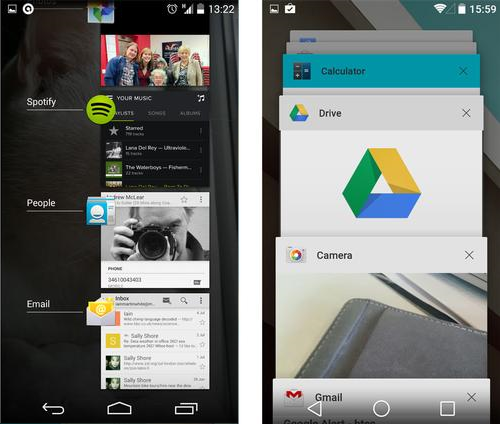
Recent apps has had something of an overhaul. The 2D list of open apps has been replaced with a 3D rotary style view which makes the old one look extremely dated. Each app has a card and can be swiped off to the side to close it as normal but also tap the ‘X’. A new feature here is that apps like Chrome will have individual cards for each open tab (not working in the developer preview).
Android Lollipop vs Android 4.4 KitKat comparison: Notification bar
The drop down notification bar has also had a complete redesign with a different layout as well as the Material Design style. You swipe down from the top of the screen as per usual but instead of tapping a button, you swipe a second time to access quick settings – which now includes a screen brightness slider, notifications (including do not disturb), and cast screen.

On the Nexus 7 is depended where you swiped down as to which drop down bar you got, but with Android L it’s the two swipe method. The cog icon will still take you to the main settings menu and the user profile is now a more subtle circle in the corner rather than an entire tile.
Android Lollipop vs Android 4.4 KitKat comparison: Notifications

Android Lollipop vs Android 4.4 KitKat comparison: Performance
So design is a massive change in Android L but there are other things too. Google has switched from the Dalvik to ART (Android runtime) which the firm says is up to twice as fast. This is present in the developer preview and although Android L is very smooth on the Nexus 5, it wasn’t as if KitKat was exactly slow. We found nothing to get excited about in benchmarks. We doubt the average user will notice any difference but things could change by the time Android L is released.
The other big performance upgrade is support for 64-bit processors. We don’t have any 64-bit Android devices yet but they will arrive later this year, probably soon after or with Android L and this will boost performance.
Android Lollipop vs Android 4.4 KitKat comparison: Battery life
A more tangible performance upgrade which we’re already experiencing is improvements on battery life. Something called Project Volta allows developers to identify where their apps are draining battery power so they can make improvements.
On top of this a new battery saver mode promises to add 90 minutes battery life to the Nexus 5, so it will be a similar story for most smartphones. In fact, the Nexus 5 has been tested with Android L and showed an improvement of more than 120 minutes which is very impressive.
Android Lollipop vs Android 4.4 KitKat comparison: Security
A new feature which has been announced for Android L is location and proximity based levels of security. Not present in the developer preview, it will enable users to unlock their smartphone or tablet without entering a PIN, pattern lock or similar, but only when they are close enough to a device like an Android Wear smartwatch or in a location like their own home.
Best Prices Today: Android L vs Android KitKat
Author: Chris Martin, Managing Editor, Tech Advisor

Tech Advisor Managing Editor Chris got his break as a reporter at infamous site The Inquirer and has been with us for more than 12 years. With a BA degree in Music Technology, audio is his specialism, but over the years he has reviewed all kinds of gadgets, from smartwatches to mesh Wi-Fi to coffee machines.
Recent stories by Chris Martin:
- The Pixel Tablet just got a new lease of life, but it could be bad news too
- Samsung Galaxy Tab A11 review: Compact, capable & cheap
- Google Pixel 10: Key upgrades, staggered release dates and prices revealed
