Christmas is all about the kids. Nothing beats the smile on their faces (and your own) when you know you’ve given them a gift they really love.
But shopping for kids’ Christmas presents has become incredibly difficult – not because you’re short of options, but because there’s almost too much choice. And when it comes to choosing tech for a child who probably knows more about it than you do, you can feel out of your depth.
We’ve put together our ultimate tech gift list for kids, which contains dozens of tech products any child would be happy to receive. We’ve considered all ages, from youngsters right through to teenagers, and focused strongly on value for money – Christmas is an expensive time, especially when it might seem that quantity of gifts can outweigh quality.
In this round-up we’ve got everything from big-ticket gifts like phones, tablets, laptops, smartwatches and games consoles to smaller tech accessories that would make great stocking fillers or less expensive presents from their favourite aunt or uncle. There’s something here that every kid will love.
( See even more tech gift ideas .)
Tablet
It has a 7in IPS display with a reasonably low resolution of 1024×600 pixels, but it’s a great size for small hands and the 1.3GHz quad-core processor inside is more than sufficient for playing casual children’s games.
It’s reasonably easy to lock down the Fire 7 using parental controls, but if this is a particular concern we also recommend the Kids Edition (£99.99). It comes with a tough bumper case and a two-year warranty that covers accidental damage, plus access to games, videos, music and more at Kids Unlimited.
You’ll find more tablets primed for children in our round-up of the best kids’ tablets .
Smartphone

It wouldn’t surprise us if top of your kids’ Christmas list was a new iPhone , but few parents are going to have the budget for that without looking down to an older model.
If you have made the decision that your child is old enough to be responsible for a smartphone, our favourite budget option is the Poco X3 NFC. It packs in strong specs, an excellent camera, a beautiful display, and absolutely fantastic battery life.
We’ve also rounded up some great SIM deals to keep them in credit.
See more best budget phone ideas.
Personalised PopSocket

You’ve probably seen PopSockets before, but you might not know what they’re called. Attaching to the back of a smartphone or tablet they lie flat but, when needed, can pop up and act as a stand or simply offer extra grip.
If you’re worried about your child smashing their expensive new device as it tumbles from their tiny hands, they’re seriously worth a look.
As a gift we love this personalised Custom PopGrip , which costs £16.99 direct from PopSockets. It comes in a range of colours, and you can apply your own photo to complete the design.
Power Banks & Wireless Chargers

Phones, tablets and handheld gaming consoles keep the kids quiet only so long as their batteries hold out. A power bank or wireless charger (or even a combo of the two) can extend the peace until you feel they’ve had enough screen time.
There is a crazy amount of choice out there, especially for power banks, which come in various capacities with differing inputs, outputs, features and performance. Make sure you know what you’re looking for by checking out our buying advice on the best power banks and the best wireless chargers .
Budget Laptop

Every year we run into the same question from parents looking to buy the ultimate Christmas gift for their child: a laptop. But not just any laptop, a gaming laptop that costs less than £300.
But while integrated graphics chips are getting more powerful all the time, to play the most intensive games your child is really going to want a dedicated graphics card and a powerful processor, and that you are not going to find at £300. You might actually find better value from a budget gaming desktop PC.
All that said, one of the best budget laptops you’ll find is the Lenovo IdeaPad S340 . Check it out.
Media Streamer

The best budget media streamer you can buy, Roku Express is cheaper than the Fire TV Stick and more user-friendly than Chromecast. Offering access to all the main free and paid catch-up and on-demand streaming services, it’s an ideal gift for an older child who is picky about what they watch.
A free mobile app adds voice- and remote control, but the diminutive Roku Express will sit unobtrusively below a TV where it will happily operate with the bundled infra-red remote control . Small and light, it’s difficult to believe such a tiny box can make such a huge difference to your entertainment experience.
Wireless Earbuds

If your budget stretches to AirPods , great – your kids will love it. If not, there are significantly cheaper options that will amaze you with their quality.
These budget buds from TaoTronics cost under £50 and they sound great. Audio performance is impressive and the huge battery life means you won’t need to interrupt your listening sessions very often.
For more budget options see our round-up of the best budget wireless earbuds .
Wireless Headphones

A pair of headphones is the gift that keeps on giving – to you, since you no longer need to listen to yet another Minecraft walkthrough on YouTube.
But kids’ ears are sensitive, and an adult pair of cans is neither going to fit comfortably nor build in proper safeguards that will avoid life-long damage to their hearing.
We like the JuniorJams from Puro Sound Labs, one of several recommended in our separate guide to the best kids’ headphones . These good-looking wireless on-ear headphones are lightweight and foldable. They feature volume limiting (to the standard 85dB), and sound quality is excellent – possibly the best we’ve heard on a kids product.
Smart Speaker

You don’t need us to tell you kids love music, and sometimes it’s okay to let them blast it out for the whole house to hear rather than slapping on a pair of headphones.
Bluetooth speakers used to go down a treat, allowing them to stream YouTube or Spotify music from their phones and tablets, but these days it’s becoming increasingly difficult to recommend budget models when we are faced with some excellent-value smart speakers.
Smartwatch

Apple is still one of the coolest tech companies in the world in the eyes of most teenagers. If they have an iPhone, an Apple Watch would make like the best present ever. Except, as with all Apple stuff, the new Watch Series 6 is kind of expensive, starting at £379.
What you might not be aware of is that you can still buy the older Apple Watch Series 3 ( reviewed ) at a discounted price of £195.
By buying the older model you miss out on some of the more recent developments in the line – for example, the faster processor, the larger always-on display – but the Series 3 remains a great smartwatch, and a gift your child will love.
If they don’t have an iPhone, of course, a Wear OS (or other) smartwatch might be more practical. We’ve rounded up some of the best smartwatches , as well as some great deals on smartwatches .
Fitness Tracker

Older kids are going to prefer something like the Fitbit Inspire 2 , which sits at the top of our best Fitbits chart , but for youngsters the Ace 2 is the one to choose.
Currently retailing at a reduced price of £49.99, the Ace 2 ( reviewed ) is a waterproof fitness tracker aimed at kids aged 6 and above. With accounts previously accessible only by those aged 13 and above, with Ace 2 Fitbit has opened up a whole new world of activity tracking for children, who are most likely going to want to use it because it feels like a grown-up thing to do.
For its younger audience Fitbit has made some tweaks, stripping out the calorie counting and adding in different modes for kids and parents. Through the Kid View, kids can see only their stats data, badges and clock face options, plus are able to connect with parent-approved friends.
Be sure to check out the best Fitbit deals before you buy.
Bluetooth Tracker

If your teenage children are forever losing things, one of the biggest worries is often that they will misplace their house keys.
Tile has a range of Bluetooth trackers that can be attached to the stuff they need to keep safe, and not only to their keys but also their bag, wallet, phone and other stuff that may or may not be carried around with them.
The cheapest option is the Tile Mate , which has a 200ft range, a loud alarm, a water-resistant design and a one-year battery life. The more you buy the cheaper each becomes.
Action Camera

Digital cameras used to be a go-to gift for kids, but these days they all use their phones. That is unless they are too young to own a phone.
The other time kids might need a camera is, of course, when they are participating in extreme sports. You know, climbing trees, jumping in puddles and so forth.
GoPro is easily the best known action camera maker, but many of its products might be a little too expensive for your budget. And depending on your child’s age they could also be overly complicated to use.
For younger kids we like the Kidizoom Action Cam from VTech. It’s perfect for little adventurers aged 5 and above.
In the box you’ll find various accessories, such as a waterproof case and various mounts, but you will need to supply your own microSD card for storage.
Able to capture high-definition photos and video, kids can add a range of visual effects, enjoy three included games, and mess about with various shooting modes: stop motion, slow motion, fast motion and reverse video.
Instant Camera or Printer

Our favourite instant camera , the Instax Mini 11 from Fujifilm lets you print out the photos you love from the camera itself – very much like the old Polaroid cameras that were around when we were kids.
It’s very user-friendly, making it a good option for photography beginners and kids. Its design is chunky and retro, available in a range of colours.
Also consider an instant printer for those pics they already snapped on a phone.
3D Pen

Help your kids bring their drawings to life with a 3D pen. These work by heating up and then extruding through a nozzle coloured plastic that can be shaped in any way you like, allowing for hours of fun.
Drawing with 3D pens can be tricky to get the hang of, and when you’re dealing with hot plastic and components you want to ensure your kids are safe, so 3D pens tend to be targeted at different age groups. For real youngsters we love the Oaxis MyFirst 3D Pen (£36.99).
These USB-rechargeable devices are chunky enough for little hands to clutch on to, and there are no accessible hot parts. One-button operation simplifies use, so the only hand-holding they’ll need is in clean-up – but even that should be simple thanks to the non-adhesive filament that can be easily lifted from hard surfaces. (6m of filament is included in the box.)
Electric Toothbrush

Of all the products we wrote about during last year’s holiday buying season, electric toothbrushes were arguably among the most popular (quite possibly because there are some great deals to be had). The kids want to get in on that action too, and for us adults anything that is going to help convince them to actually brush their teeth is a win-win.
We love this fun Deeno-Saur toothbrush for kids aged 3 and above. With soft bristles it won’t be too harsh on their teeth, and the head is wrapped in silicone protection to guard their teeth and gums. It uses sonic brushing technology and an intuitive bristle pattern to get into all the hard-to-reach areas, and there’s a tongue cleaner on the rear.
A timer makes sure they keep brushing for two minutes, and when connected to a companion app (iOS and Android) they will earn Deeno coins as a reward. In the box you’ll find two heads, some stickers for customising Deeno, a tiny egg that hatches into a dinosaur, and three AAA batteries.
But Deeno-Saur is just one of many electric toothbrushes aimed at kids, and with the upcoming release of Frozen 2 we think this Elsa toothbrush from Oral-B will also go down well.
For older kids Oral-B also makes the Junior Kids Electric Toothbrush , aimed at those aged 6-12.
Gaming Headset

If your child is playing games online with their friends, they are going to need a headset – but where on earth do you start?
We like the Turtle Beach Recon 70P. It’s PlayStation colours, but it’s a wired headset (with a 1m cable) so will work on all platforms. It has an adjustable headband, and swivelling ear cups to help find a comfortable fit.
Turtle Beach has placed a flip-mic and volume controls on one of the earcups rather than using an in-line control, making it easy to adjust volume and mute your mic in the heat of battle.
We’ve got some more budget options here.
Light-Up Keyboard

Okay so it’s definitely true that it’s possible to spend a ton of cash on keyboards aimed at gamers, and there is a lot to be said for some of the more premium models and how much they can enhance your gameplay. But, at a certain age, it’s also true that all a child wants is for their keyboard to light up in funky colours.
This Trust GTX 830-RW might seem like a substantial present, especially wrapped up under the tree, but in fact it’s available for much less than you might think.
It’s a full-size model, and supports rainbow wave illumination with adjustable brightness. For gamers there’s anti-ghosting, and you can disable the Windows button to stop accidental presses meaning the Start menu will pop up at exactly the wrong time.
It’s a wired keyboard, so setup couldn’t be easier: you just plug and play, with no worries about what happens when the batteries run out.
For some more premium options see our guide to the best gaming keyboards .
Light-Up Mouse

Our favourite gaming mouse right now is the Razer Naga Trinity , but with an RRP of £99 it’s a lot of money for a computer mouse for a child.
Fortunately, everything we just said about keyboards above also applies to mice, and we’ve seen 10-year-olds seriously lose their, ah, bananas, over this £12.99 mouse from VersionTech. Why? Because it lights up in seven different colours. Seriously.
It’s a pretty basic optical mouse in other respects, although almost certainly a little less basic than the generic mouse that was sold with their desktop, and an improvement over many laptop trackpads.
There’s an ergonomic design with a rubber scroll wheel, and it’s wired so you simply plug it into a USB port and you’re away. A dpi button on top lets you switch between 800, 1200, 1600 and 2400dpi resolution, and there are two side buttons. Simple, but they’ll love it.
Games Gift Cards & Subscriptions

So it’s pretty obvious that most kids would love a games console (although some of the recently launched models are both expensive and very difficult to get hold of), but what if they’ve already got one?
A subscription to the exclusive membership service or a gift card for their preferred game store would go down a treat. Here are some options:
Subscription services
- Nintendo Switch Online 12-month membership (RRP £17.99)
- PlayStation Plus 12-month membership (RRP £49.99)
- Xbox Live 12-month Gold membership (RRP £49.99)
Gift cards
- Nintendo eShop Gift Card (£15/£25/£50)
- PlayStation Network Wallet Top-Up (£5/£10/£15/£25/£35/£40/£50/£100)
- Xbox Live Credit (£5/£10/£15/£20/£25/£40/£50)
- STEAM Wallet Card ( £10 / £20 / £50 )
- GAME Gift Card (£5/£10/£25/£50)
Digital Magazine Subscription

Kids learn an incredible amount through having so much free-to-play and streaming video at their fingertips, but it’s important that they keep reading in order to get a good grasp of spelling, grammar and the written language.
If you really can’t drag them away from their gadgets, consider a Readly subscription, which puts a whole world of digital magazines in their hands – they can read as much as they like. Not all titles are going to be age-appropriate, but with 4,525 available (including our own), they are sure to find something of interest.
You can get a Readly gift card direct from the site , with options for three-month (£23.97), six-month (£47.94), nine-month (£71.91) and annual (£95.88) packages.
Author: Marie Black, Global Director of Content Operations, Foundry

Marie is Global Director of Content Operations at Foundry. A Journalism graduate from the London College of Printing, she’s worked in tech media for 20 years. These days she is focused on refining editorial processes and workflows, and on our evergreen, transactional and custom content strategy.
Recent stories by Marie Black:
- Best eSIMs 2026: Top eSIM plans for travel, business & home use
- Smart Answers: GenAI tool makes it quicker and easier to find the info you need on Tech Advisor
- Is WhatsApp down? How to check and fix WhatsApp
We’re all taking more and better quality photographs these days, thanks to smartphones, but we’re less likely to turn them into physical media. However, if you do, a portable printer – also known as an instant printer – is the answer.
These handy, pocket-sized gadgets will let you take your best phone images and print them out wherever you are, with the option to add filters, effects, stickers and other fun additions in the process. You might think of them as a ‘phone printer’ or ‘phone photo printer’ as they connect wirelessly via Bluetooth.
Top brands include Instax, Polaroid, Canon and there’s a range of options at different prices, including photos which develop with a bit of time or ‘Zink’ models which print instantly. Typically, they are compatible with both Android and iPhone as well as potentially other platforms, too.
Some new models we’ll be testing soon, and likely adding to this list, include the Polaroid Hi-Print (2nd Generation) and freshly announced Instax mini Link+, which goes on sale 28 January. For now, the best models we’ve reviewed are below with detailed information, followed by an in-depth buying guide.
If you want something a little more retro and even more instant, you can also buy a camera that prints photos as you shoot them, just like an old-fashioned Polaroid. Take a look at our round-up of the best instant cameras to see if any take your fancy.
Best portable photo printer reviews
1. Instax Square Link – Best Overall
Pros
- Portable and stylish design
- Impressive prints
- USB-C charging
- Decent range of editing options
Cons
- Running costs add up over time
- App could do with some improvements
- QR codes on AR prints on the larger side

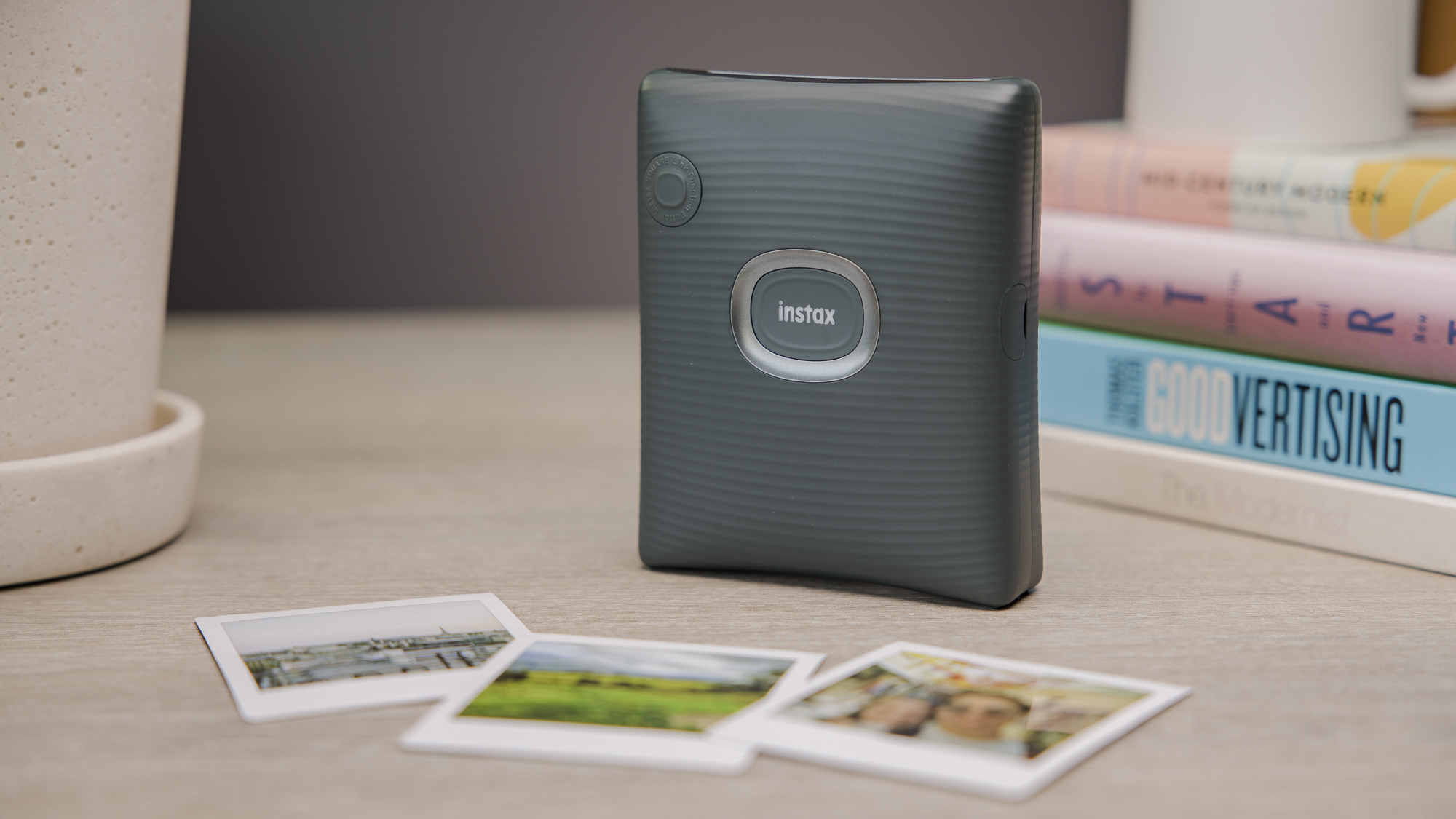
The Instax Square Link is currently the only dedicated portable printer that uses square prints, and is also Instax’s best portable printer yet.
It comes with a stylish and lightweight design, and produces bright, high-quality medium-sized snaps easily via the accompanying app. Prints take 12 seconds to eject, and around 90 seconds to develop.
There is a range of seasonal preset frames available from the Instax library for holidays such as Christmas and Valentine’s Day, as well as simple editing tools – including a dedicated AR print mode that adds either a digital animation, special effect or doodle to an image via a QR code and the app.
Unlike the Instax Link Wide or Instax Mini Link, it comes with USB-C charging, which gives faster charging speeds. This gives it the edge of its two sister products. That said, you won’t need to worry about battery life too much, as you can get around 100 prints on a single charge.
The app layout could do with a few tweaks, including making the text size bigger and improving the navigation. However, these are minor downsides to what is an excellent portable printer overall.
Who should buy the Instax Square Link?
You want a dedicated square printer with a great set of features.
Instax Square Link: Further considerations
Consider a cheaper alternative for long-term running costs.
Read our full Instax Square Link review
2. Polaroid Hi-Print – Best Dye-Sublimation Printer

Pros
- High quality prints
- Portable and refined design
- Easy app navigation
Cons
- Expensive printing costs
- Slow printing speeds
- Only 20 prints on one charge
The Polaroid Hi-Print is a simple, no-nonsense digital printer that costs less than most rivals while delivering superior print quality – though pricey paper means it’ll cost you in the long run.
Printing is slightly slower than most rivals at around 50 seconds – but this is due to it being a dye-sublimation printer, which means that the print ejects in and out at least four times to add each layer of colour, plus a protective film.
The wait is worth it, as print quality is overall extremely high and more detailed, vivid, and striking than you would get from a quicker digital instant printer.
The accompanying app is simple and user-friendly, with options to customise photos with frames, filters, aspect ratio changes, text, and stickers – but few unnecessary frills to over-complicate things.
It also syncs with any image folders on your phone, plus images from WhatsApp, Instagram, Facebook, Twitter, and more.
Who should buy the Polaroid Hi-Print?
You want high-quality prints at an affordable price with an easy-to-use app.
Polaroid Hi-Print: Further considerations
Look elsewhere for faster printing, cheaper running costs and less frequent recharging.
Read our full Polaroid Hi-Print review
3. Instax Link Wide – Best for Wide Prints

Pros
- Large, glossy prints
- Lots of filters and editing options
- Refined design
Cons
- App needs optimising
- Costs rack up over time
- Slow Micro-USB charging

The Instax Link Wide produces large, glossy prints with minimal fuss. It has a great design that is suited both for sitting in your home and for taking on the road.
Photos on the Instax Link Wide are double the size of what you’ll find on the Mini printers and cameras, but the printing speed is very quick at around 12 seconds, with 90 seconds of development time.
Like other Instax products, the prints are bright and colourful with a vintage feel. However, the quality isn’t quite as impressive as what you will find on the Polaroid Hi-Print. The running costs of this printer will stack up over time due to the cost of Instax Wide film.
The companion app provides multiple customisation options such as filters, collages and the option to add QR codes, though it could do with some improvements with its layout.
Who should buy the Instax Link Wide?
You want large, wide-angle prints with lots of editing features
Instax Link Wide: Further considerations
Choose another for modern USB-C charging.
Read our full Instax Link Wide review
4. Instax Mini Link 2 – Best for Small Prints
Pros
- Portable and funky design
- Excellent prints
- Lots of editing tools in the app
Cons
- InstaxAir can be confusing to use
- Outdated Micro-USB charging
- Expensive running costs
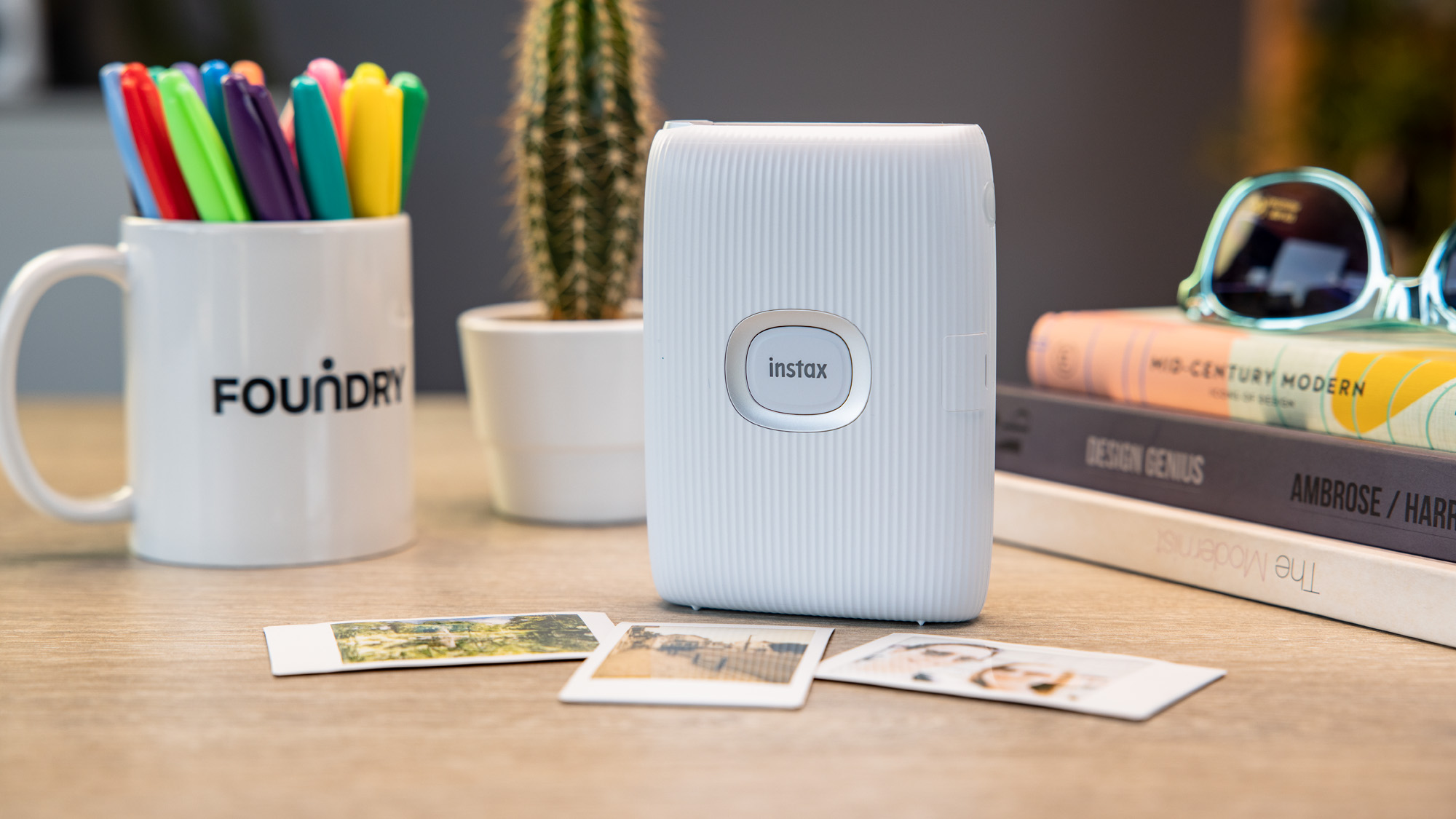
The Instax Mini Link 2 uses Fujifilm’s Instax Mini film. The Mini Link looks great, with funky colour options and a young and fresh feel.
It connects to your phone through the Mini Link app and Bluetooth, and can print photos both from your phone’s library and your social media profiles.
From the app, you can choose frames and other options, including split prints (separating one photo into two prints) and collages. You can edit photos within the app, with colour filters and dials to change the brightness, contrast and saturation.
The printer has a speed of around 12 seconds per print, supports continuous printing and can print up to 100 photos on a single charge. Photos come out clear, crisp and vibrant on the Mini film, and after printing, there’s a handy button to get a second copy instantly.
Fun options include a ‘match test’ that prints out a photo with a compatibility score between two people, and the ‘party print’ mode that allows users to add photos from up to five phones to create one Instax print. There is also the InstaxAir feature which allows you to draw patterns in the air on photos – but this can be a faff to use.
You can even use the printer as a remote control for your smartphone camera, tilting the printer back and forth to zoom in and out.
Who should buy the Instax Mini Link 2?
You want small photos which print quickly.
Instax Mini Link 2: Further considerations
Look elsewhere for something cheaper or if you need USB-C charging.
Read our full Instax Mini Link 2 review
5. Canon Selphy QX20 – Most Versatile
Pros
- Dual print sizes
- Gorgeous images
- Simple-to-use app
Cons
- Poor battery life compared to rivals
- No log of how many sheets/ink is left in app
- On the heavier side
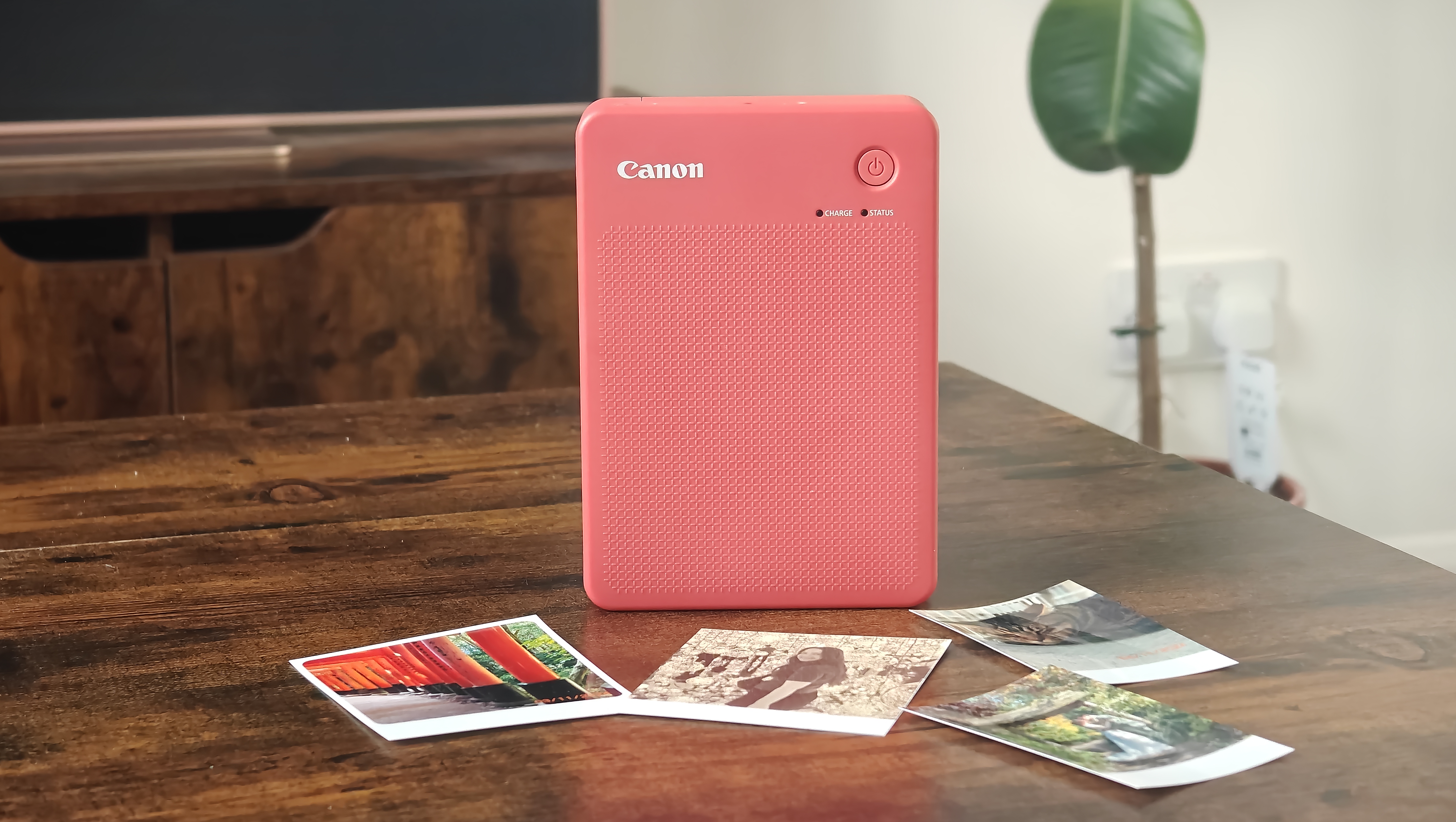
If you’re torn between what size prints you want from your portable printer, the Canon Selphy QX20 may be the device for you. It supports both square and credit-card formats, giving you plenty of versatility.
Like the Polaroid Hi-Print, the QX20 uses the thermal dye process, which produces stunning results – especially on the larger formats. The accompanying app is also simple to use, as is changing between the different paper options.
That said, the app could have improvements. There’s no way of viewing how many sheets of paper or ink are left, and the battery indicator only shows a vague estimation.
In addition, the battery life lasts for just over twenty prints, significantly less than Instax printers. Due to its dual-print support, it’s on the heavier side, making it less portable. Nonetheless, there’s nothing else on the market quite like this printer – so if you want something versatile, this is an excellent option.
Who should buy the Canon Selphy QX20?
You want a choice of print sizes with high-quality results.
Canon Selphy QX20: Further considerations
Look elsewhere for something lighter and longer battery life.
Read our full Canon SELPHY QX20 review
6. Kodak Step Instant Printer – Best for Zink Prints

Pros
- Portable design
- Affordable
- Easy to use
Cons
- A few bugs in the app
- Charges via Micro-USB
The Kodak Step is one of the most affordable printers on the market for Zink prints. Whilst Zink images aren’t quite as impressive as what you will find from brands such as Instax and Polaroid, the running costs are much cheaper, and there is no development time.
The Kodak Step keeps its design simple with a compact, rectangular shape that you can get in a range of colours. It is easy to use, even for beginners. It supports up to 25 images on a single charge.
The prints themselves are on the smaller side at 2x3in, so these are best if you’re looking for wallet-sized photos. The images come with an adhesive back so they can be used as stickers, and feature a range of colours – though some details are lost from the original images.
The app includes a range of editing options, but does have a few bugs and issues. That said, the affordable price of the Kodak Step makes this a viable portable printer that gets the job done.
Who should buy the Kodak Step?
You want a budget-friendly printer with quick printing.
Kodak Step: Further considerations
Look elsewhere for USB-C charging and better print quality.
Read our full Kodak Step Instant Printer review
7. HP Sprocket Select – Best for Larger Zink Prints

Pros
- Super lightweight
- Straightforward app UX
- Improved Zink print quality
Cons
- Occasional paper loading issues
The HP Sprocket Select is the third-generation iteration of the Sprocket 200. It boasts Bluetooth 5.0 connectivity, which allows multiple phones to connect via the straightforward Sprocket app (free on Android and iOS).
A more significant improvement is that the Select prints larger images at 2.3 x 3.4in instead of 2 x 3in – which is roughly the size of a credit card.
Like past Sprockets, the Sprocket Select prints on Zink, or “zero ink”, paper, which is cheaper than film in the long run – but at the cost of slightly washed colour tones.
Given that Zink images can be slightly dull to begin with, the Sprocket Select trumped expectations with a fair amount of detail and contrast. The colours still appeared slightly washed out but were much more vibrant than on other Zink printers we’ve tested, particularly the reds.
Who should buy the HP Sprocket Select?
You want large prints without waiting and the ability to connect multiple devices.
HP Sprocket Select: Further considerations
Look elsewhere for easier paper loading
Read our full HP Sprocket Select review
8. Kodak Step Slim Instant Printer – Best for Portability
Pros
- Slim and durable build
- Affordable running costs
- Simple to use
Cons
- Not as affordable as the Kodak Step
- Zink paper not as impressive as rival prints
- App has a few bugs
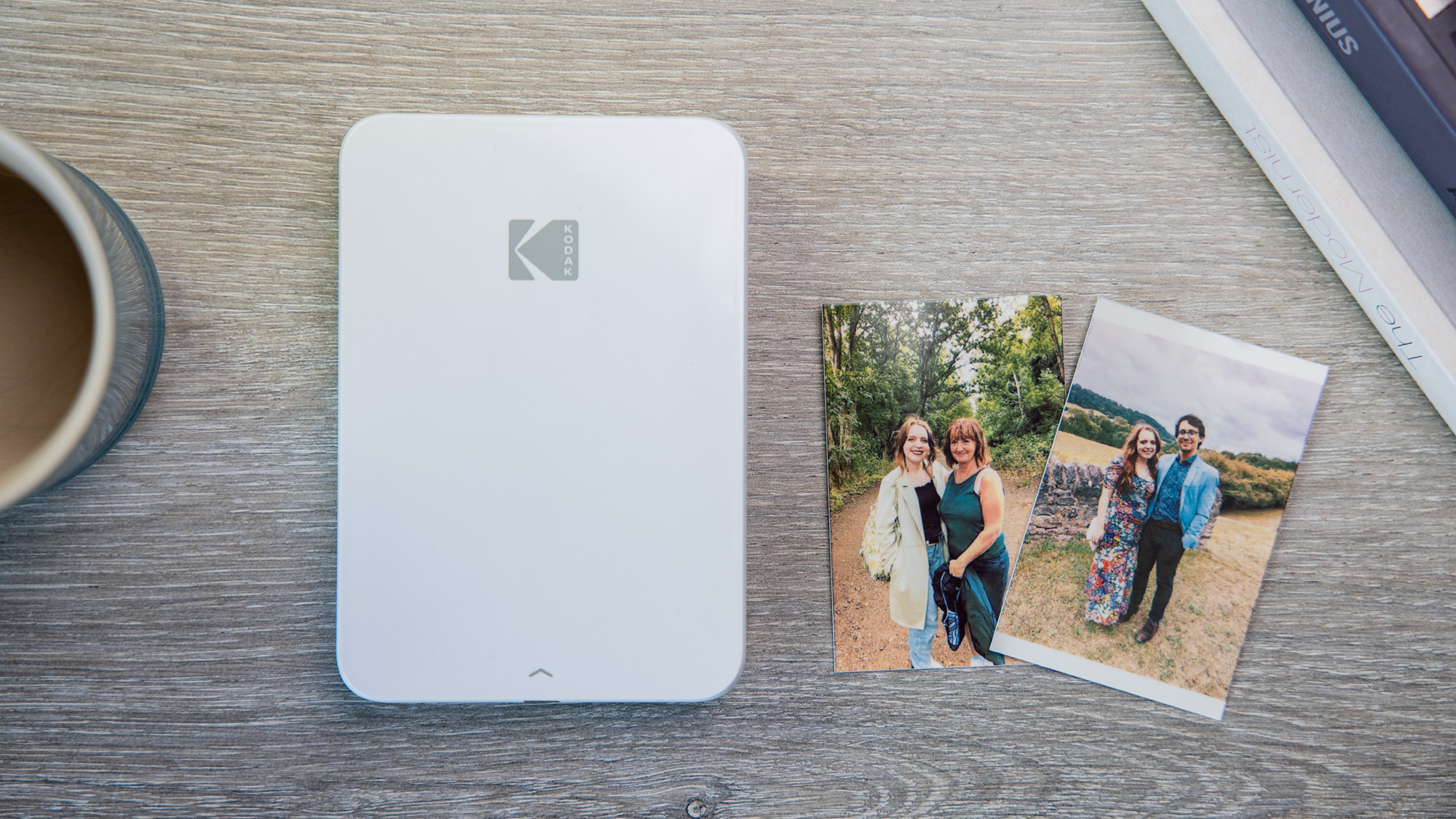
The Kodak Step Slim is one of the most portable options on the list. It is slim at 2.29cm thick and lightweight at 240g – making it easy to fit into a large pocket.
It’s easy to use as well, with the well-laid-out accompanying Kodak Step app. However, this does have a few bugs in comparison to some of the software that rivals boast. Nonetheless, you’ll still have plenty of filters, frames and more to add to your snaps.
This is another Zink printer, so prints aren’t quite as striking as what you’ll find on models from Instax and Polaroid, as this isn’t real film. However, the trade-off is that running costs are cheaper overall.
It’s not quite as affordable as its sister model, the Kodak Step, but it will still get the job done without breaking the bank.
Who should buy the Kodak Step Slim?
A pocketable printer with speedy printing.
Kodak Step Slim: Further considerations
Look elsewhere for higher quality results.
Read our full Kodak Step Slim Instant Printer review
9. Instax Mini Evo – Best Hybrid Camera

Pros
- Compact and retro design
- Long battery life
- Useful buttons and dials
Cons
- Expensive
- Frustrating menu
- Limited internal storage
Whilst the Instax Mini Evo from Fujifilm is foremost a digital and instant camera hybrid, it also has all the capabilities of a standard portable printer, making it a true all-rounder.
The Instax Mini Evo app allows you to edit photos with filters, stickers and frames – just like you can with other Instax printers. You can also transfer photos taken on the camera to the app so that they are digitally stored.
The camera itself combines features such as analogue buttons with digital effects, making for an all-around fun shooting experience. It looks refined and vintage, and not childish like some other products from the brand. The Evo comes with a lengthy battery life, as well as a portable size.
Unfortunately, whilst all these features are compelling, the Instax Mini Evo comes with a hefty price tag upfront, plus the running cost of Instax film on top of this.
Who should buy the Instax Mini Evo?
You want an instant printer with a camera built in.
Instax Mini Evo: Further considerations
Look elsewhere for something more affordable if the camera isn’t a must.
Read our full Instax Mini Evo review
10. Instax Wide Evo – Premium Hybrid Camera
Pros
- Vintage-inspired build
- Large and glossy prints
- Wide range of filters and shooting options
Cons
- Very expensive for what it is
- Cumbersome build
- Battery and internal storage on the lower side
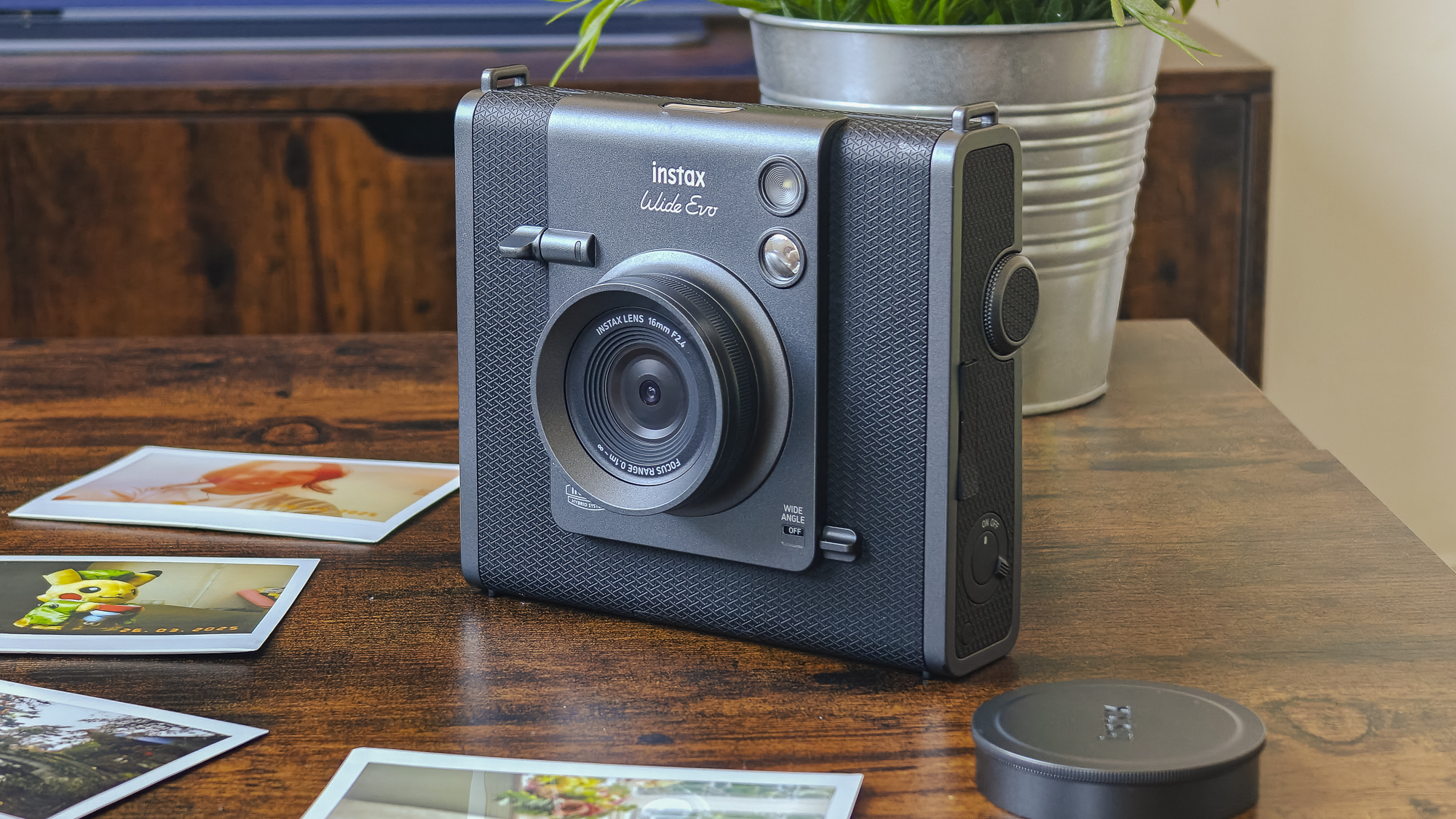
The Instax Wide Evo is another digital and instant camera hybrid, but this uses Wide film rather than Mini film. It also has a much higher price tag than the Mini Evo, so it’s only suitable if you want to splash the cash.
There’s no denying that the Wide Evo has a premium, nostalgic build that stands out from the crowd, while the endless array of settings means that you’ll have plenty to experiment with when shooting. Images taken on the camera can also be transferred to the accompanying app.
However, the build is heavy and bulky, meaning it’s not the best for using out and about unless you have a big enough bag to hand. Plus, both the battery life and internal storage are on the low side. There are better options in this chart.
Who should buy the Instax Wide Evo?
You want an instant camera and printer hybrid that produces larger-sized prints.
Instax Wide Evo: Further considerations
The Instax Mini Evo offers a very similar experience for a fraction of the price.
Read our full Instax Wide Evo review
How we test portable photo printers
In simple terms, we use it no differently than if you bought one, got it out of the box and powered it up. We use it as if it were our own, ensuring we print plenty of different photos to check the quality of the final product, as well as all the features along the way.
Why you should trust Tech Advisor for portable printer reviews and buying advice
Independent buying advice is the reason Tech Advisor exists, and we’ve been doing it for 30 years. Our in-house team and contributors are experts in all things tech and gadgets, and we have your best interests at heart.
Who curated this article?
Hannah is our Entertainment Editor but has been testing and reviewing all kinds of tech for six years at Tech Advisor. She knows everything there is to know about portable printers and has reviewed most of the models you see above.
How to choose the best portable printer
Fortunately, choosing a portable printer isn’t as complicated or as overwhelming as something like a smartphone. There are small number of reliable brands that make the best models, and you should be able to figure out which one is best for your needs quickly.
As well as reading our honest thoughts on each printer above, you first need to make sure the device is compatible with the phone or other device you want to use it with. Most have apps for Android and iOS, so you can then move on to making sure it does everything you need.
The main difference between different portable printers is the size and type of photo they print. Some are square and use Zink paper which prints within seconds, for example, while others offer a choice of sizes and use film, which you have to wait to develop. Your last key decision is how much to spend – ultimately, that’s up to you but budget models cost a little over £50/$50 but you can spend £100/$100-£200/$200 if you want a fancier model.
How does a portable photo printer work?
Portable photo printers essentially connect to your smartphone via Bluetooth, usually via an app. The photos taken on your phone (or downloaded onto your image library) can then be viewed in the app, and printed from here.
There is no need to involve your PC at all, and most printers should support both iOS and Android models.
The actual printing process depends on the model you buy. The Polaroid Hi-Print uses a lengthier dye-sublimation process, whilst Instax printers instantly print photos, which then develop over a short period of time. Zink photo printers print instantly, but this is technically not real film. It all comes down to your preferences for the final look of your photos.
What size photos does a portable photo printer produce?
That depends on which printer you choose! We have the dimensions of all the prints that the devices use in our linked reviews, but the most common format is around the size of a credit card. However, you can opt for something larger if you prefer prints that take up more space. Typically, a portable printer can only print one size of photos.
What is the difference between a portable photo printer and an instant camera hybrid?
Some models of instant cameras (which print photos as soon as you hit the shutter button) also include the ability to print photos from other devices, just as you would on a portable printer – one example is the Instax Mini Evo.
Can I edit photos in a portable photo printer app?
Most leading manufacturers of portable photo printers offer some level of editing in their smartphone apps. These include filters, stickers, frames, text and even more advanced things like QR codes.
Where do I buy more instant printer film?
Related content
- Best instant cameras
- Accessory reviews
- Best phones
Author: Hannah Cowton-Barnes, Entertainment Editor, Tech Advisor

As Tech Advisor’s Entertainment Editor, Hannah is the resident expert in all things streaming, film and TV. Before joining Tech Advisor in 2019, she studied Theatre and Performance at the University of Leeds and created a website dedicated to geek culture and lifestyle. She’s also reviewed a whole range of gadgets including flagship smartphones, wearables and styling tools. Outside of Foundry, she’s written freelance pieces for Polygon, Metro and Den of Geek, and is proud to be a Women Techmakers Ambassador for Google.
Recent stories by Hannah Cowton-Barnes:
- These are the best instant cameras you can buy
- Instax Wide Evo review: Big prints, bigger price
- Canon Selphy QX20 review: The best of both worlds
