At a Glance
Expert’s Rating
Our Verdict
The idea of adding live TV to a home media server is attractive, particularly if you can stream it to portable devices as well as fixed PCs. For DVBLink to be a viable Consumer product, though, it needs more work on installation. While DVBLogic may want to retain flexibility, it’s currently much too messy for most general customers. It feels like setting up a modem, circa 1992.
Best Prices Today: DVBLogic DVBLink

What is the DVBLogic DVBLink?
DVBLogic DVBLink takes the idea of watching TV on your PC one step further. This software runs it instead on a Network Attached Storage (NAS) device, so in the same way you can play music or show films stored in an NAS through any device attached to the network, you can now view live TV, too, and record programmes directly to the hard drives in the NAS.
You need a couple of pieces of hardware available before you can install DVBLink. You need an NAS, obviously, and it needs to be one from a list of supported devices. DVBLogic supports a wide selection of units from asustor, iomega, NetGear, Qnap and Synology, but you have to download the specific version from site and they’re, awkwardly, categorised by the type of processor in the NAS. See all digital home reviews .
DVBLogic DVBLink: installing a TV tuner
You also need a USB-based tuner for your intended TV source. This could be a terrestrial, satellite or cable TV device, but again, it needs to be supported by the DVBLogic software.
DVBLink is not a fully-fledged consumer product. DVBLogic says it’s aiming at the ‘Prosumer’ market, which we tend to think of as early adopters of high-end technology. This product is more for the enthusiast, the kind of customer who tinkers with a Raspberry Pi and patches files in Python.
It’s a multi-stage download and installation process. It could really do with a step-by-step installation guide or, better, a wizard to run through the most common installation settings. Although DVBLogic claims the DIY approach is to cater for the wide range of Electronic Program Guide (EPG) and Media Centre applications supported, there’s no reason they couldn’t be built into a simple set of multi-choice screens in an installation routine.
Setting up the DVBLogic DVBLink
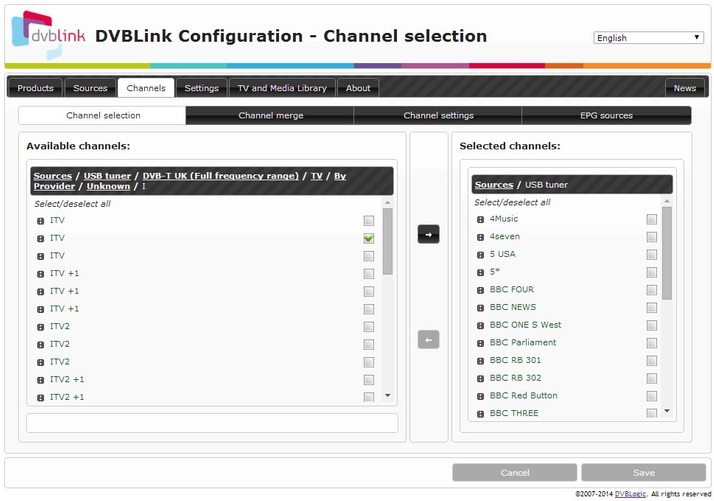
We used a Synology DS214 NAS with twin WD 1TB hard drives. The operating system in this NAS uses a modern, multi-window design and once installed, the DVBLink server shows up as a package in the Synology Package Centre. As well as the server and TV source applications, you’ll need a third-party EPG and there are several free applications supported.
You’ll also need a player and, again, there are several free applications you can use. Once the player is linked to the DVBLink server, you’re finally set to go. You can select from the channels you chose at installation to view and record directly to the NAS.
Specs
DVBLogic DVBLink: Specs
- Supported NAS, supported TV tuner, client device (PC, Android, iOS)
Best Prices Today: DVBLogic DVBLink
