The iRobot Home app plays a pivotal role in the Roomba experience, serving as the bridge between your robotic helper and the clean floors you covet.
Over the years, it has evolved from a straightforward remote access tool to a sophisticated hub of features and settings that make your Roomba smarter and more efficient.
With recent updates, the app has become more user-friendly, offering a richer set of features that cater to the diverse needs of users’ households. But some of the best iRobot app features are easy to miss.
Read on for a comprehensive tour of the gotta-know iRobot app features you’re not using, along with a walkthrough of the overall app interface.
If it’s time to replace or upgrade your robot vacuum, see our top recommendations in our round-ups of the best robot vacuums and, for more budget-friendly options, the best cheap robot vacuums .
10 iRobot app features you need to know about
The user interface is intuitively designed, featuring a clean layout where you can easily navigate through various functionalities. Key sections include the dashboard, where you get a quick overview of your Roomba’s status; Schedules, for planning cleaning sessions; and History, which logs all past cleaning activities.
1. Set cleaning preferences and schedules
One of the app’s core strengths lies in its flexibility. You can command your Roomba to clean specific rooms or set it to tackle the entire house. The app allows you to customize how and when your Roomba cleans.
For example, you might set it to clean high-traffic areas more frequently or schedule a full-house clean when you know you’ll be out. Adjusting these settings ensures that your cleaning needs are met without any hassle.
2. Customize your cleaning preferences
For those looking to get a bit more granular, the app offers several options to fine-tune your Roomba’s cleaning process.
To find these options, scroll down and tap Product Settings on the main iRobot app screen, then tap Cleaning Preferences .
Among the Cleaning Preferences options you won’t want to miss include:
- Cleaning passes: Decide how many times Roomba passes over a particular area, which is especially useful in homes with pets or children.
- Bin full behavior: You can choose whether your Roomba continues to clean with a full bin or heads back to its dock to ensure it doesn’t spread the collected dirt.
- Room size clean: The Roomba adapts the cleaning session according to the room size for optimal cleanliness without wasting battery life.
- Liquid amount: For models that support mopping, you can control the volume of cleaning solution used, tailoring it to the level of soil or type of flooring.
- Obstacle detection: Enhance your Roomba’s ability to navigate around obstacles—including pet waste—preventing jams and ensuring efficient cleaning paths.
- Suction power: Modify suction based on the surface being cleaned—turn it up for deep carpet cleaning or reduce it for delicate areas or to reduce noise.
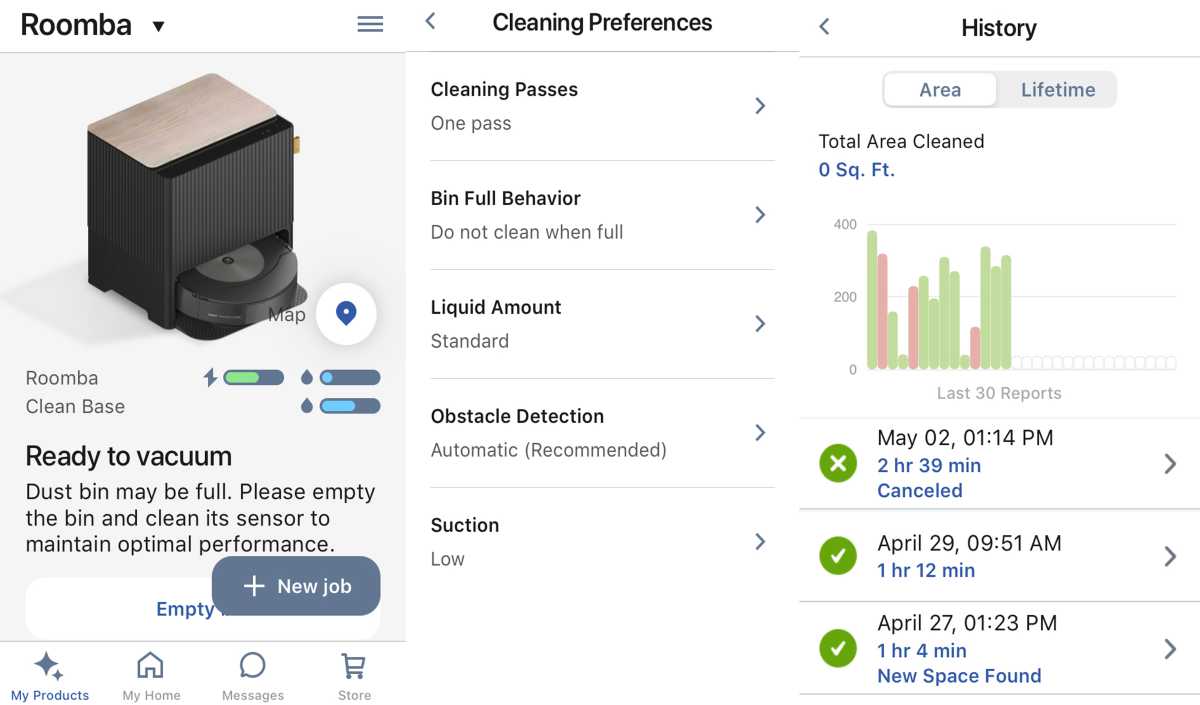
You can monitor your robot cleaner’s status, customize cleaning preferences, and review cleaning history in the iRobot Home app.
Michael Ansaldo/Foundry
3. Create Keep Out, No Mop, and Clean zones
The Smart Maps feature is a game-changer for customized cleaning. It allows your Roomba to map your home’s layout, enabling targeted cleaning of specific areas.
You can also create Keep Out Zones to prevent your Roomba from entering areas where it might get stuck or disturb pets; No Mop Zones to protect areas that shouldn’t get wet; and Clean Zones that allow your Roomba to clean smaller high-traffic areas within a room, such as an entryway or under the kitchen table.
4. Use custom voice commands
Once connected, you can leverage voice commands to control your Roomba without lifting a finger. Simply say “Alexa, ask Roomba to start cleaning the living room,” and watch your Roomba spring into action.
This feature is particularly handy when you’re busy with other tasks or if you want to quickly address a spill or mess in a specific area.
5. Keep track of when your Roomba needs maintenance
Keeping your Roomba in top shape is key to its longevity and effectiveness. The iRobot app includes a maintenance tracking feature that alerts you when parts need attention. Whether it’s the filter that needs cleaning or the brushes that require replacement, the app ensures you’re on top of it.
Regular maintenance not only extends the life of your Roomba but also ensures it cleans at its best. By following the app’s maintenance notifications, you can avoid common issues like decreased suction or ineffective cleaning.
6. Review detailed cleaning reports
After each cleaning session, the iRobot app provides a detailed report that includes a map of the areas cleaned. This feature is invaluable for understanding your Roomba’s cleaning patterns and efficiency.
The reports also highlight the amount of dirt detected and any areas the Roomba may have missed. This insight allows you to adjust the cleaning schedule or settings, ensuring your home gets the thorough cleaning it needs.
For those who enjoy being on the cutting edge of technology, the iRobot app offers access to beta features. This option allows you to test new functionalities before they are officially released.
Participating in the beta program can give you a glimpse into future enhancements and provide an opportunity to give feedback directly to iRobot, helping shape the development of new features.
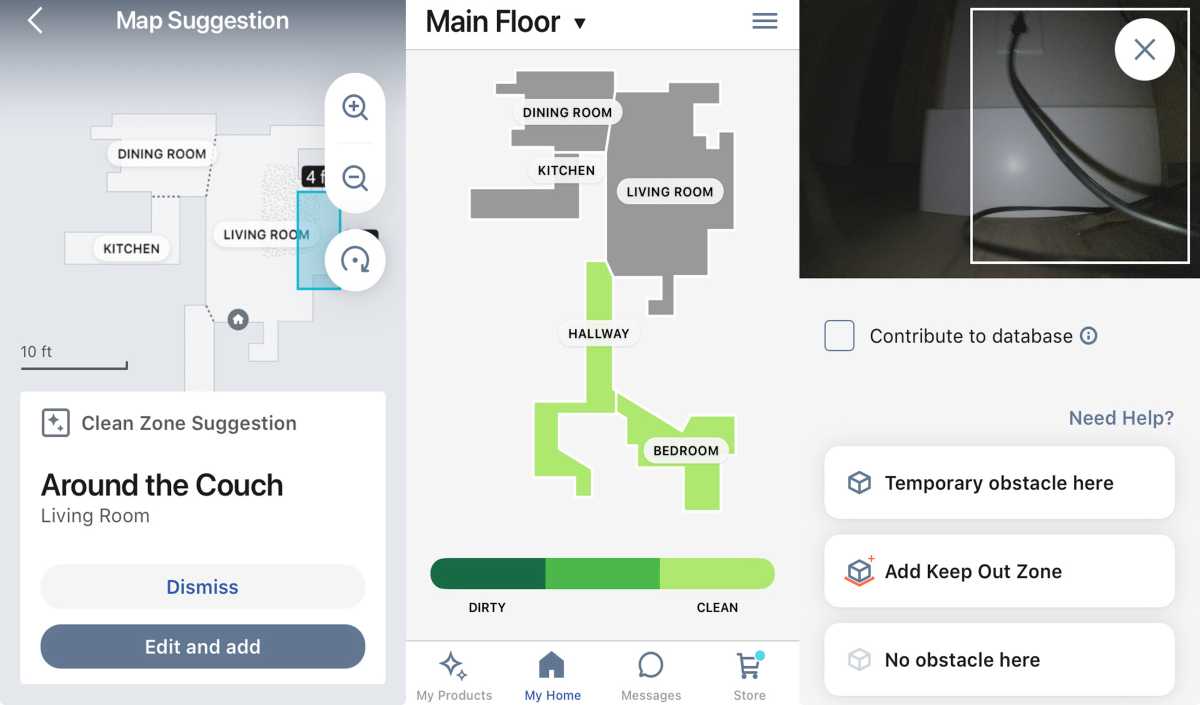
The iRobot Home app can suggest clean zones, provide “dirt detective intelligence,” and snap pictures of obstacles it encounters for you to review.
Michael Ansaldo/Foundry
8. Optimize your Roomba’s cleaning efficiency
To truly maximize the effectiveness of your Roomba, it’s essential to understand and utilize the app’s full capabilities. Here are some tips for optimizing your Roomba’s performance:
- Smart mapping: Take the time to set up and refine your Roomba’s Smart Maps. The more accurate the map, the more efficiently your Roomba can navigate and clean. Remember, you can always update the map as the layout of your home changes or as you add new furniture.
- Scheduling: Use the app to schedule regular cleanings during times you’re less likely to be disturbed, like when you’re at work or overnight in areas away from bedrooms. Consistent cleaning not only keeps your home cleaner but also ensures even wear on your Roomba’s battery and brushes.
- Custom preferences: Experiment with different cleaning preferences for different seasons or occasions. For instance, increase the cleaning frequency during allergy season or after hosting events.
9. Troubleshoot common issues
Despite its advanced technology, your Roomba might encounter issues from time to time. The iRobot app is equipped with troubleshooting guides to help resolve common problems like connectivity issues or mapping errors.
The app provides step-by-step solutions, often allowing you to fix the issue without needing to contact customer support.
10. Maximize battery life
To extend the battery life of your Roomba, the app offers several useful tips. Regularly cleaning the Roomba’s brushes and filters can prevent the vacuum from working harder than necessary, which in turn conserves battery power.
Additionally, storing your Roomba on its Home Base when not in use ensures it is always charged and ready for its next job without overcharging the battery.

You can enhance your Roomba’s ability to navigate around obstacles, including pet waste.
iRobot
Conclusion: Harness your Roomba’s full potential with the iRobot app
Exploring all the features offered by the iRobot app can transform your experience with Roomba from good to great. Each feature is designed not only to make cleaning easier but also to ensure it is as thorough and efficient as possible.
One of the most significant advantages of the iRobot Home app is its ability to personalize your cleaning experience. By adjusting settings like the suction power, cleaning passes, and even the specific rooms to be cleaned, you can tailor your Roomba’s operation to match your home’s unique needs.
Whether dealing with pet hair, various floor types, or different levels of foot traffic, the app gives you the control to customize each cleaning session. Don’t hesitate to try out different configurations to see what works best for your space and lifestyle. The more you explore, the more you’ll be able to unlock the full potential of your Roomba.
Staying updated with the latest app updates and participating in beta testing can provide early access to new functionalities that enhance your cleaning routine even further. Engaging with these features allows you to take advantage of the latest advancements in robotic cleaning technology, ensuring your Roomba remains at the cutting edge and operates at peak efficiency.
Remember that the iRobot app is more than just a remote control for your vacuum; it’s a cleaning tool designed to make a much-loathed chore more bearable and convenient. Whether you’re looking to tweak every setting or someone who prefers to set it and forget it, the app has something to offer.
Take the time to explore these features, and you’ll likely find that your Roomba can do much more than you initially thought.
Author: Michael Ansaldo, Contributor, Tech Advisor

Michael Ansaldo is veteran consumer and business technology journalist. He’s been a contributor to our sister site TechHive since 2013, covering robot vacuums, home security cameras, and other smart devices. He previously served as PCWorld’s Small Business Editor, and his tech coverage has appeared in Wired, Macworld, Mac|Life, Mobile Magazine, Enterprise.Nxt, Executive Travel, and other publications.
Recent stories by Michael Ansaldo:
- Buying a refurbished robot vacuum: 7 pros and cons
- 8 expert tips for picking the right robot vacuum for your home
- 8 critical tips for extending your robot vacuum’s life expectancy
