At a Glance
Expert’s Rating
Our Verdict
HMA is a well-known VPN service that offers decent speeds and easy-to-use apps. The problem is that it’s not great at unblocking streaming services and it’s no-logs policy doesn’t mean zero logs.
Best Prices Today: HMA VPN

HideMyAss, or HMA for short, is a VPN service that was established back in 2005 in the UK. In 2015 it was bought by AVG, which was then itself bought by Avast, companies better known for antivirus software.
It is undoubtedly one of the best-known VPNs but until May 2020 it was one to avoid because, unlike virtually all its rivals it logged information such as your IP address. And being based in the UK – one of the worst jurisdictions for privacy – meant there was every reason to choose one of HMA’s competitors.
But the service now runs a no-logs policy which has been audited by VerSprite. That sounds good, but as you’ll see later on, it’s not all it’s cracked up to be.
One of the highlights is still the comprehensive server coverage: 190 countries and more than 290 locations, including quite a few African countries that you don’t usually find with other VPN services. Quite a few of these (over 200) are virtual locations, but these are marked as ‘via [location]’ in the app.

Virtual locations can be useful if you want to appear to be in that country but the real sever location is near to you as you’ll get faster speeds.
Talking of speeds, HMA also claims 20Gbps connections (for some of its servers) and has an IP shuffle feature which lets you choose how frequently your virtual address is changed to prevent website trackers keeping tabs on you and also to help you access blocked websites.
Apps & Features
Recently, the apps have had an overhaul and are now easier to use. The interface is broadly similar to other VPN services: you can pick a location yourself or use the Lightning Connect feature to automatically pick the fastest server.

It’s great to be able to search the list, which is divided by continent, but there’s no information about ping or server load shown next to each one.
On the left-hand side – for the Windows and macOS apps – you can click on a continent as well as a list of Recent, P2P and streaming servers.
All apps include explanations of more advanced features such as the kill switch and split tunnelling. Some of those features are only available on certain devices though. Split tunnelling is only on Android for some reason, and there’s no kill switch on iOS.

In the Windows app you do have the additional option of an ‘App kill switch’ which does the same job as the main kill switch but only cuts the internet connection to the apps you specify. It also forces the VPN to connect when you launch those apps, which stops you forgetting, but it would be nice if that was a separate tick box, just in case you didn’t want that behaviour.
Annoyingly, clicking the ADD APPLICATION button opens a File Explorer-type dialogue box set to C:WindowsSystem32, a folder in which you’re not going to find the apps you want to choose. It’s a shame there’s no list of installed apps here: instead you have to know to browse to one of the two Program Files folders and navigate your way to the correct executable file for the app(s) you want.
Privacy
Even by its own admission, HMA has had a rough ride over the past five or six years having been acquired twice, first by AVG, then by Avast, which bought AVG.
It has also come under fire for handing over information to authorities which has resulted in at least one user being convicted and jailed. This is one of the problems with using a VPN based in the UK – one the ‘Five Eyes’ countries which shares information and where authorities can, and will, demand that businesses hand over customer data.
This is why the very overdue no-logs policy is such a big deal. It’s also why HMA commissioned VerSprite to audit its apps and service to make sure the policy was actually being implemented.
In general, that’s good news, but the report itself isn’t public so you’ll just have to take HMA’s word that it passed with flying colours.
Many ‘zero logs’ VPNs do record some anonymised data to maintain and improve the service, and HMA says this is the purpose for this logging, but in HMA’s case, this is personally identifiable information – not anonymous.
Performance
We tested HMA in Windows and on Android and iOS. It passed our IP and DNS leak tests without issue, which is exactly what you’d hope for considering HMA runs its own DNS service as well.
There’s not yet any support for WireGuard, but in any case, with our office being shut due to lockdown I couldn’t run any outright speed tests even using OpenVPN on a ‘slow’ domestic broadband connection running at 70Mbps.
Of course I could still test to see how much HMA slowed that connection down, especially using servers far away, such as the west coast of the USA.
Interestingly enough, there’s a built-in speed test tool, but I found this under-reports the performance on offer. For example, my nearest location – London – was showing as 43Mbps, but testing using Ookla’s Speed Test, it actually ran at my connection’s full 70Mbps (and 18Mbps up).
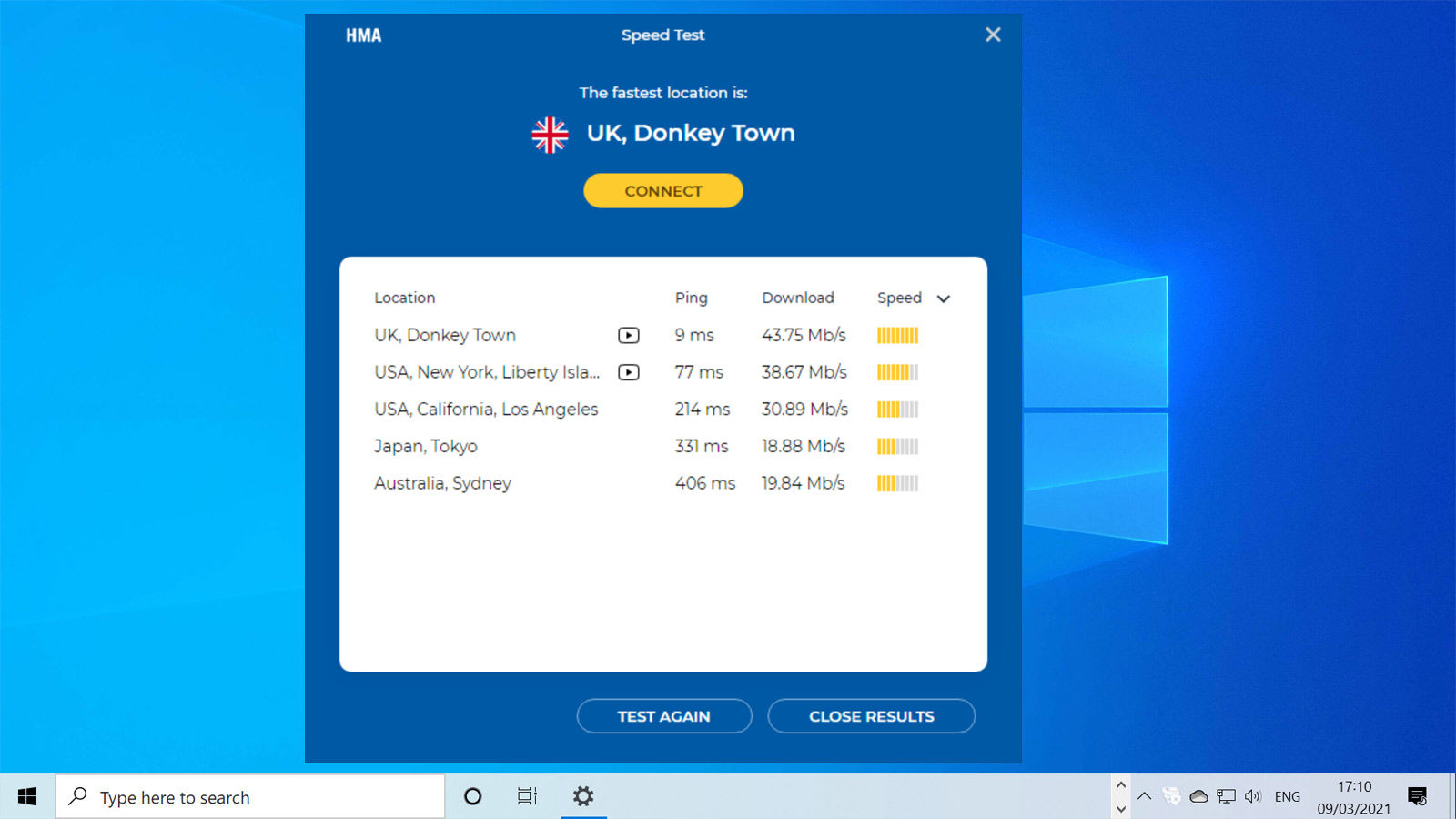
Speeds did tail off the further I went, but despite the <20Mbps reported for Sydney in the app, Speed Test showed the connection was actually 56Mbps, which is very respectable given the distance from the UK.
Servers are tagged for being optimised for streaming and P2P, but this extends only to a handful in the US and Europe.

Pricing & plans
Click on Price Plans from the website’s top menu and you’ll see only two options: 1 month (for £5.59, discounted from the usual £7.99) and a 12-month plan which brings the cost down to £3.29 per month and, because it’s a UK company, this includes VAT.
You can use an HMA subscription on five devices at the same time, but can install the app on as many devices as you like.
There are other plans available if you scroll down and click the ‘See more plans’ link, but the 12-month one was the cheapest at the time of writing: the 24-month option was more expensive at £3.39 per month.
Unusually, there’s a seven-day free trial, but you’ll have to enter payment details and cancel in the app (which is simple) before the end of the trial or you’ll be billed for a full year.
This will let you test out the service and find out if it unblocks the services you want to watch, and also see if it’s quick enough for you.
After paying for a subscription, you’re still covered by a 30-day money back guarantee. There’s no way to pay anonymously: the options at the checkout are limited to PayPal and Visa/Mastercard.

Verdict
Since last looking at HMA it has improved the service in quite a few ways, including split tunneling and a no-logs policy. But both come with caveats: the former is only on Android, and the latter doesn’t quite mean what it says.
Much of this would be forgivable if the service were cheaper, but with its poor success rate of unblocking streaming services it’s it’s difficult to recommend the service unless you specifically want servers in some of the more unusual locations that HMA offers.
NordVPN and Surfshark are two good alternatives, which also do a much better job of unblocking streaming services.
- All security news
- Best antivirus software for Windows (plus free options )
- Best antivirus deals
- How to hide your IP address
- What is a VPN and why you need one
- How to use a VPN
- How to speed up a VPN
- Best VPN services (plus free options )
- Best VPN deals
Specs
HMA VPN: Specs
- 1-month account
- based in London, UK
- holds logs
- VPN protocols: L2TP/IPsec, OpenVPN, PPTP
- 5 concurrent devices
- no data allowance limit
- client software for Windows, OS X, Android, iOS
- platform support: Linux/OS X/Windows/iOS/Android/DD-WRT
- manual configuration option
- P2P policy not advised
Best Prices Today: HMA VPN
Author: Jim Martin, Executive Editor, Tech Advisor

Jim has been testing and reviewing products for over 20 years. His main beats include VPN services and antivirus. He also covers smart home tech, mesh Wi-Fi and electric bikes.
Recent stories by Jim Martin:
- The best VPN services 2026: Stay protected with our expert top picks
- Is Amazon Alexa down? It’s probably not just you
- The best VPN for streaming in 2025
