
In the same way in which Google keeps track of apps you download, it also keeps a record of all your Android devices. This can get confusing so here’s to delete Android devices from Google Play store.
The amount of device in my list is somewhat extreme since I review Android smartphones and tablets week in week out. However, if you’ve sold or lost an old Android device then you probably don’t want to see it when you’re on the Google Play store. So removing it will save confusion and avoid apps being sent you a device you no longer own.
How to delete Android devices from Google Play store
You’re not actually able to delete devices from your Google Play account, per se. However, you can stop them from being shown in menus.
Step One
Open your web browser and navigate to the Google Play Store.

Step Two
Click the gear button in the top-right corner of the screen and select ‘Settings’.

Step Three
On this page you’ll be given a list of ‘My Devices’ and you can un-tick the ‘Show in menus’ box in the ‘Visibility’ column.
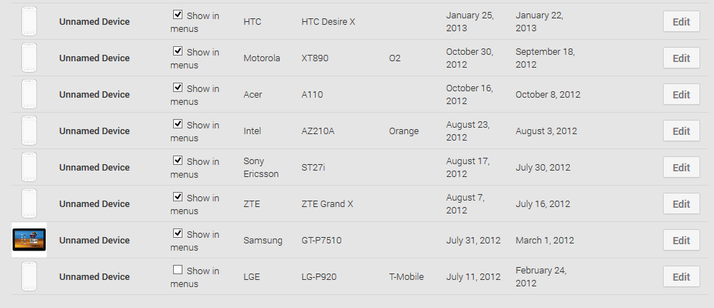
How to rename devices in the Google Play Store
While you’re at it, you can also rename your devices for better organisation. Google will often use product codes for devices rather than the actual name which can be confusing. For example, LG-D802 instead of LG G2 . This could also be handy if you want to indicate who uses each device (if they are linked to the same Google account).
So for those of you with multiple devices, here’s how to rename them.
Step One
Follow steps one and two from the above guide.
Step Two
Click the ‘Edit button on the device you wish to rename.
Step Three
Enter the new name in the box under ‘Nickname’ and when you’re done, click ‘Update’.

Simple, and now your devices will show up with the names you want.
Author: Chris Martin, Managing Editor, Tech Advisor

Tech Advisor Managing Editor Chris got his break as a reporter at infamous site The Inquirer and has been with us for more than 12 years. With a BA degree in Music Technology, audio is his specialism, but over the years he has reviewed all kinds of gadgets, from smartwatches to mesh Wi-Fi to coffee machines.
Recent stories by Chris Martin:
- Every Pixel 10a colour is now ‘confirmed’
- In 2026 my ‘previous gen’ phone rule applies more than ever
- See the Samsung Galaxy S26 Ultra in 3D spinning glory
