One of the great new features in Android N is Direct Reply, which lets you reply to messages from a notification without opening the app. Here’s how to Direct Reply in Android N. (Also see how to Direct Reply in Android Lollipop and Marshmallow .)
Directly replying to a notification couldn’t be simpler, although it doesn’t work with all apps. For example, if you hit Reply on a Gmail message notification Android N will open Gmail for you to draft your message. Below we’ve used Hangouts, though other messaging apps should also be supported.
Learn how to get Android N today. Plus, learn how to split screen in Android N .
How to Direct Reply in Android N
• Wait for a notification of a new message to come in
• Drag down from the top of the screen to view the notification
• Rather than tapping on the notification to open the associated app, tap Reply directly below the notification
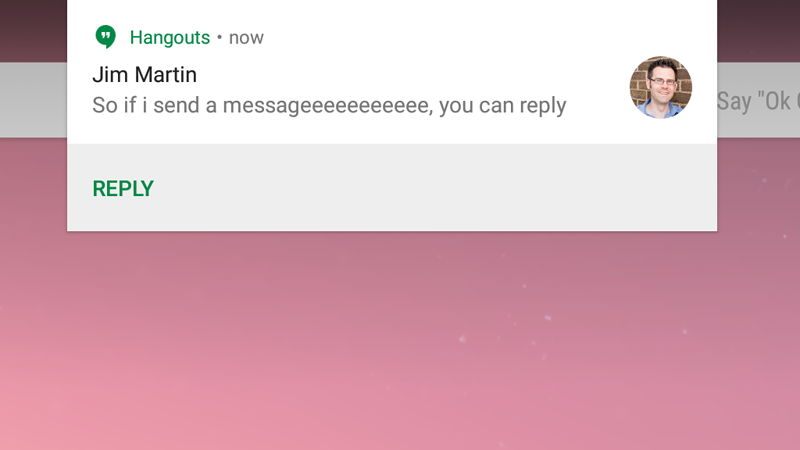
• A green bar will appear below with the words ‘Send message’. Tap this to bring up the onscreen keyboard

• When you’re happy with your message, tap the triangle icon to send, all without ever opening the app

Another new feature to do with the way notifications are handled in Android N is the ability to set preferences for notifications from individual apps, direct from the notification bar. Also see: Android N UK release date, new feature and name rumours

When a new notification arrives, simply tap and hold it to bring up options relevant to that app: Show notifications silently; block all notifications; and Don’t silence or block. Make your choice and tap Finished.
The new Nexus 5 and Nexus 6 for 2016 will be the first devices to run the final version of Android N in Q3 of this year.
Follow Marie Brewis on Twitter
Author: Marie Black, Global Director of Content Operations, Foundry

Marie is Global Director of Content Operations at Foundry. A Journalism graduate from the London College of Printing, she’s worked in tech media for 20 years. These days she is focused on refining editorial processes and workflows, and on our evergreen, transactional and custom content strategy.
Recent stories by Marie Black:
- Best eSIMs 2026: Top eSIM plans for travel, business & home use
- Smart Answers: GenAI tool makes it quicker and easier to find the info you need on Tech Advisor
- Is WhatsApp down? How to check and fix WhatsApp
