For decades, Microsoft released major new versions of Word and its other Office apps once every few years. That’s when the bulk of new features were added, with security and bug fixes prioritised at other times.
However, that all changed with the release of Office 365 (now Microsoft 365 ). This subscription gets you Word, Excel, Powerpoint and many other services, all for a single monthly cost. New features are added to these apps all the time, despite Microsoft continuing to make standalone versions.
Microsoft 365 is undeniably good value if you use multiple Office apps each month, but it could be harder to justify if you just use Word occasionally.
Fortunately, there are plenty of other options if you’re looking to get started with Microsoft’s classic word processor. You can access it across all your devices, whether you’re working on a phone, tablet, laptop or PC.
In this article, we’ll run through some free workarounds for accessing Microsoft Word, plus where to find some big discounts. But if you’d rather not pay a penny, there are plenty free alternative office suites that are still compatible with Microsoft’s software.
Download the free Office apps for iOS, Android and Windows
Microsoft’s aim is for all your files to seamlessly sync between devices via OneDrive. With that in mind, its Word, Excel and PowerPoint apps are free to download for Android and iOS . All the relevant links are below.
iOS apps
- Word for iOS
- Excel for iOS
- PowerPoint for iOS
Android apps (links only work on devices with Google Play Store installed)
- Word for Android
- Excel for Android
- PowerPoint for Android
Windows apps
- Word for Windows 10/11
- Excel for Windows 10/11
- PowerPoint for Windows 10/11
You’ll always be able to open and read documents for free, but can only create and edit them for free on a device with a screen smaller than 10.1 inches. That means you can edit Word documents from a smartphone or small tablet, but if you’re on a larger tablet, laptop, or desktop PC you can only view them.
On iOS, the distinction is simpler at least: you can create and edit documents for free on any iPhone, regular iPad, iPad Air or Mini, but iPad Pro users can only view files.
It’s worth noting that even on a device with a smaller screen, you only get what Microsoft calls the ‘core’ Office experience, with some editing tools and features not available to free users.

Try Microsoft 365 for free
Being able to view documents alone is of limited use, so if you’re using a device with a screen bigger than 10.1in you’ll want some extra functionality.
Several new features were added in the April 2020 rebranding of Office 365 to Microsoft 365 , but none are likely to fundamentally change the way you use the apps. They include a consumer-focused Teams subscription, new Family Safety app and a handful of new features across the core Office programs.
The good news is there’s a one-month free trial of Microsoft 365, so you can test it out without committing to paying a penny.
Get Microsoft Teams for free
Microsoft is offering a one-month free trial of all the subscriptions.
Get Microsoft 365 Education for free
Teachers and students can get Microsoft 365 Education for free, which includes Office Online (Microsoft Word, Excel, PowerPoint, OneNote) and Microsoft Teams, as well as unlimited personal cloud storage.
You need to be a full-time or part-time faculty or staff member or student with a valid school email to be eligible. Check if you qualify here by entering your school email address at the bottom of the page.
Microsoft Home Use Program Discount
While it’s not completely free, you can save 30% on a Microsoft 365 subscription through your employer via Microsoft’s Home Use Program for 365 Family or Personal subscriptions.
You just need to check your eligibility by entering your corporate email address. If your employer qualifies, you would receive a verification link via email to authenticate your Microsoft account which enables access to the 30% discount. See if you qualify here .
Free Office alternatives
If you need more functionality than the Office apps give you for free, but don’t want to pay for Office 365, there are various alternatives to Microsoft Office out there that are completely free.
Our recommendation is LibreOffice – it’s a full suite that’s regularly updated and allows you to open and save documents in Microsoft formats.
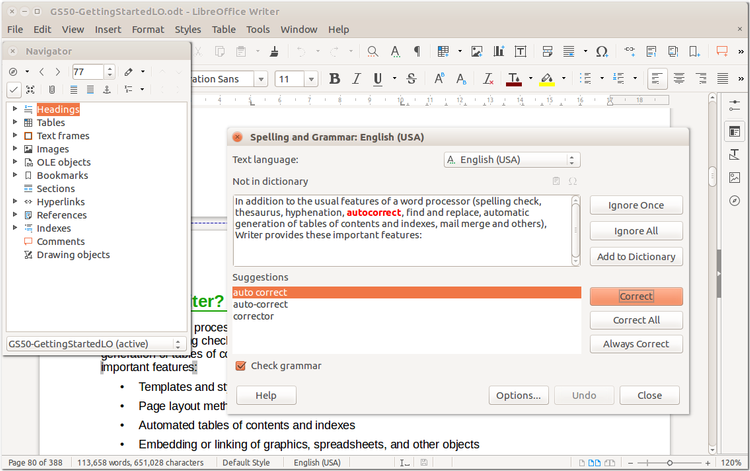
Should you happen to dislike Libre Office, you can also check out free alternatives such as WPS Office , Free Office and Google Drive , which includes Docs , Sheets and Slides .
- Microsoft 365 buying guide
- How to get Microsoft Excel for free
- How to get Microsoft PowerPoint for free
- Does Windows 11 come with Microsoft Office?
Author: Chris Martin, Managing Editor, Tech Advisor

Tech Advisor Managing Editor Chris got his break as a reporter at infamous site The Inquirer and has been with us for more than 12 years. With a BA degree in Music Technology, audio is his specialism, but over the years he has reviewed all kinds of gadgets, from smartwatches to mesh Wi-Fi to coffee machines.
Recent stories by Chris Martin:
- How to download the Android 16 QPR Beta 3 on your phone
- When is Google I/O 2025 and what to expect?
- How to delete Instagram
