If you use Google Now to initiate phone calls or send texts, adding nicknames to your Google contacts can make the process feel more natural. Here’s how to add nicknames to Android. See all Android how tos .
A great example of this is when you call your mum. You’re not going to ask Google Now to call Rosemary (or whatever your mum’s name might be). That’s just weird. Give your mum the nickname ‘mum’ and you can ask it to call mum instead.
It’s really easy to add a nickname to your Google Contacts. I already have my mum saved as mum on my phone, so here I’ll use ‘boyfriend’ as an example instead. Also see: How to use Google Now . If you’re on an iPhone you can also add a nickname to your iOS contact .
How to add nicknames to Google Contacts
• Open Google Now or the Google app on your phone
• Either say Ok Google or tap the microphone to speak, or tap in the text field to begin your query
• Tell Google about a contact and their relationship to you. For example, ‘Rosemary is my mum’, or ‘Michael is my boyfriend’

• If you have more than one contact to which this relationship may apply, Google will ask you to select which one you mean – just tap on it. Also see: What is OK Google?
• To save your contact with that nickname, tap on the tick in a blue circle
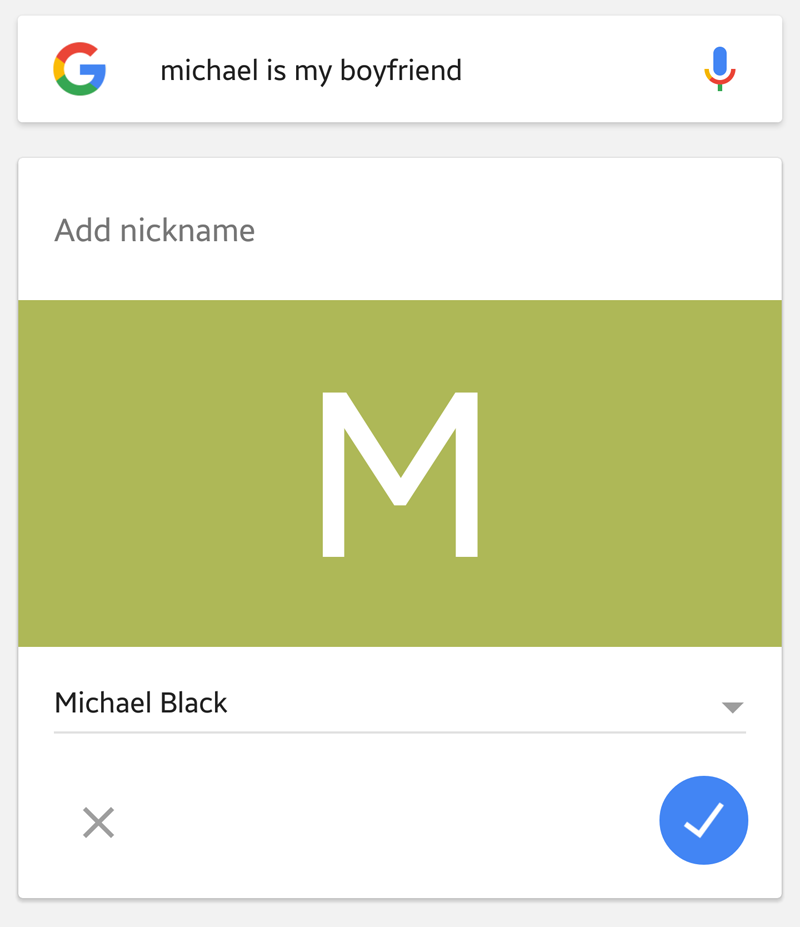
• Google will confirm that the nickname has been added

• To later remove that nickname, follow the above process but this time say ‘Michael is not my boyfriend’. Google will ask whether you want to remove the nickname; if you do, tap the blue tick icon

• Once you have saved them you can also manage your nicknames by opening Google Now and selecting Settings, Accounts & privacy, Nicknames
Follow Marie Brewis on Twitter
Author: Marie Black, Global Director of Content Operations, Foundry

Marie is Global Director of Content Operations at Foundry. A Journalism graduate from the London College of Printing, she’s worked in tech media for 20 years. These days she is focused on refining editorial processes and workflows, and on our evergreen, transactional and custom content strategy.
Recent stories by Marie Black:
- Best eSIMs 2026: Top eSIM plans for travel, business & home use
- Is WhatsApp down? How to check and fix WhatsApp
- Pay £1 for mobile data on your next trip abroad
