With so many photos cluttering up our smartphones these days, it can be hard to spend any time looking at them or arranging them into collections to remind us of important events or celebrate different stages of life.
That’s where photobooks can be an excellent option: they take digital photos and turn them into printed versions, beautifully arranged in themed albums. Here’s how to make a photobook online.
What you’ll need
There are very few requirements for assembling your photobook. All you need is access to the pictures you want in your album (it’s probably best if they’re already downloaded to your PC), plus an internet connection so you can use one of the many excellent printing services.
We’ve already put together a roundup of the best photobook services , so you can find out in advance how much you can expect to pay and the variety of themes and books available.
With these in place, you can set about creating your photobook. Here’s a general guide to the process. While we’ll use one photobook printing service as an example, the method is usually the same across any of the other sites.
How to create a photobook
After you’ve chosen the service you want to use, go to its website and select the Photobook section. Somewhere on the page you’ll have the option to Make your book or Create your book . Click this and you’ll enter the creator tool.

The first thing to decide is the style of your photobook. There should be various formats available that have differing numbers of pages as well as specific themes. These can include weddings, a newborn baby, holidays and many others.
Choose the style and size of the one you want, then click the Make This Photo Book button or equivalent.

At this point, you may need to create an account; these are free and enable you to save the Photobooks so you can retrieve them later on.
Now you’ll need to upload the photos you want to use. Some services prefer them to be on your hard drive, while others can use online options such as Google Photos, Facebook or Instagram. If you use one of the latter, you’ll need to grant the service access to your photos. Choose the method most useful to you, then upload the images.

With the photos uploaded, you can begin arranging your photobook. Most services will have an autofill feature that automatically places your images into the pages but if you prefer a more hands-on approach, you’ll be able to rearrange them by dragging and dropping them into the correct panels.

If your photos are too low resolution, the creator software should warn you so you can choose a more suitable alternative. Generally, this is more of an issue for full-page layouts. If you go for a collage effect, you can get away with a lower quality image without the picture looking grainy or fuzzy.

If you want to see how the whole book will look, try opening up the All Pages view so you can check you haven’t doubled up any pictures or put similar ones next to each other.
Most services also give you the ability to add background colours, text or stickers, all of which you can select from the side menus. All edits are non-permanent, so make as many changes as you like, experimenting with ideas, knowing that you’re not stuck with them until you order the book.

When you’re happy with your creation, click the Review and Buy (or similar) button, which will give you any final options such as matt or gloss finishes for the pages and cover.
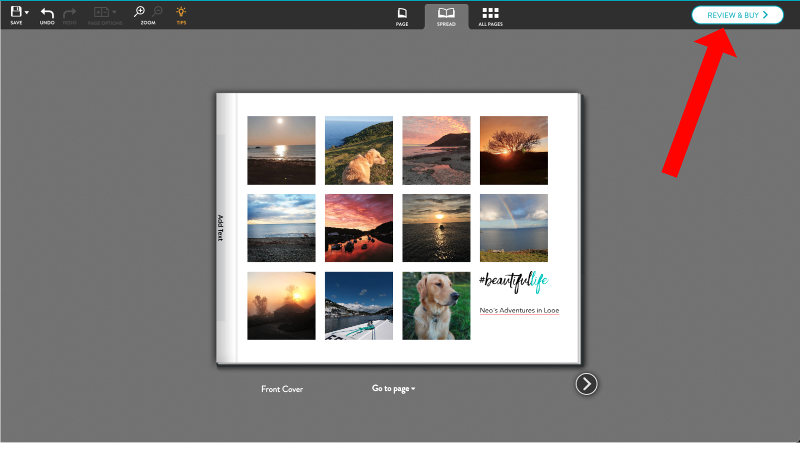
Add the complete photobook to your cart, check out and you’ll soon have the printed versions of those old photos in your hand.
- Best cheap or free photo editing software
- Best digital photo frames
- How to download Instagram photos
Author: Martyn Casserly, Contributor, Tech Advisor

Martyn has been involved with tech ever since the arrival of his ZX Spectrum back in the early 80s. He covers iOS, Android, Windows and macOS, writing tutorials, buying guides and reviews.
Recent stories by Martyn Casserly:
- How to scan documents with your phone’s camera
- How to flip a photo on Android
- Is Instagram down?
Photobox
Photobox is one of the best-known photo printing companies in the UK and Europe, although it ships worldwide. Alongside photos it also offers personalised calendars, canvas prints, cards, mugs, and of course photobooks.
Prices start from £0.09/$0.12 each for standard 6×4 prints or £0.11/$0.15 if you prefer the premium option that uses higher grade paper and comes in a protective box. You can move up to 7×5 for £0.19/$0.25 plus there’s the option to use a variety of larger formats, topping out at 15×10 for £2.50/$3.30.
Photobox also offers square prints for Instagram-style images, ‘retro’ prints that look like they were taken on a Polaroid instamatic, photobooth strips, posters and collages.
Its selection of photobooks is impressive. From the 13.7 x 13.7cm Little Moments book that starts at 24 images, through A4 landscape-format yearbooks, specialised offerings for parents, romance, and there’s even the ability to create storybooks for little children by using your own artwork.
If you want a coffee-table style tome, then there’s the luxurious A4 Pro Lay Flat which not only features a special binding that allows the book to open easily and stay that way on a table but also has a personalised spine, extra-thick paper, and presentation box.
If you’re not confident in creating the photobook yourself, there’s the Photobox Easy Create software, which makes putting together your album very simple indeed. Just choose the style, answer a few questions, then Photobox will do all the work for you. If you’re happy with the results you can order the book as is or use the editing tools to fine tune the whole thing.
Visit Photobox
FreePrints

One of the best deals around at the moment, in terms of photo printing, has to be FreePrints. As the name suggests, the service will print your photos for free, up to a maximum of 45 per month, and all you pay for is the postage.
Ah, you might be thinking, but that postage is probably incredibly expensive isn’t it? Well, no. The maximum amount you’ll ever pay is £3.99 and every month the limit resets and you’re allowed another batch of photos, making it over 500 free per year.
So how does it make money? Well, the free prints are 6×4 inches but FreePrints offers a range of sizes and finishes, all of which cost extra. You’re still able to order the 45 free ones if you choose, but we think the idea is that after a while you might want to upgrade, at which point FreePrints will make more of a profit than if might have from the postage allowance.
Whatever the case, it’s a great way to get those images off of your phone and onto paper.
Note that you’ll need to use either the Android or iOS app to use FreePrints: you can’t upload photos from a laptop.
Visit FreePrints
Mixbook

If you’re primarily interested in photobooks and live in the US, then take a look at Mixbook as it offers a vast choice of styles. There’s also a new UK store, so the company caters for both sides of the ocean.
You can select from over 450 templates, with landscape, portrait or square formats, many of which allow you to have soft or hardcovers, dust jackets, and even leather.
Whether it’s for a wedding, a memorable vacation, recording the efforts of a sports team, or a simple collection of memories for a family, Mixbook will have something for you.
Prices start at around £15.99/$15.99 plus shipping for photobooks, but there’s also a selection of cards, posters, calendars and canvas prints that you can use to brighten up your home.
Visit Mixbook
Bonus Print

Bonus Print is a name that was a regular feature on British high streets for many years. Whereas the demand for printing photos may have diminished somewhat, the company still offers a wide range of options, plus the creation of Photobooks.
Like Photobox and others on this list, Bonus Print has plenty of choice when it comes to photo prints. Sizes start 4×4 and cost £0.07/$0.09 each, but you can also opt for 5×5, 6×5,7×5 or poster sized prints if you prefer. There’s also the retro-style, which resembles old Polaroids, which can also include different colours for the surround rather than the traditional white.
You can add professional features like borders for an additional cost, and the prints all come in either matte or gloss.
It’s not only smaller photos available though, as you can order wall-art sized prints that come on photo paper, canvas, aluminium or even use acrylic paint.
On the photobook side, prices start at £9.99/£13.20. You can build your album and make it your own by selecting the type of cover, binding, the paper used, and of course the layout of all the images. The service offers either an offline editor that you download to your PC or there’s an online one if you prefer to keep things in the cloud. There’s even a smartphone app so you can make your photobook while on the bus or on your lunchbreak.
Visit Bonus Print
Snapfish

If you’re looking for choice, then Snapfish is hard to beat. Alongside the normal photo print sizes, you’ll find posters, panoramas, polaroid-style, instagram squares, photobooth strips, collages and others.
It doesn’t end there though, as you can take your favourite images and have them printed on canvas posters, beach towels, blankets, mugs, flower pots, cushions, and even phone cases for iPhones and Samsung Galaxy devices.
When it comes to photobooks, Snapfish has a great range of sizes and styles. There’s the large 15.5 x 11in landscape hardbacks that cost around £43/$57, down to the 6 x 4in Landscape style that is a more affordable £7.99/$10.
As you’d expect, there’s a wide selection of templates available – more than 100 in fact – that cover new babies, weddings, travel, family, Christmas, and general collections.
Visit Snapfish

There are also various sizes of photo prints you can order, whether on a selection of papers, acrylic or metal. There’s also offerings for posters, mousemats, blankets, mugs, and cards.
Author: Martyn Casserly, Contributor, Tech Advisor
Martyn has been involved with tech ever since the arrival of his ZX Spectrum back in the early 80s. He covers iOS, Android, Windows and macOS, writing tutorials, buying guides and reviews.
Recent stories by Martyn Casserly:
- What is Google Gemini?
- How to back up your data for free
- You can now buy Microsoft Office 2024 on Amazon without a 365 subscription
