If you’re anything like me, you probably spend a fair amount of time reading articles on your phone. But a lot of times, the point you’re trying to get to can be buried paragraphs down.
What if you just want to skip straight to it? Luckily, your Android phone can now do that for you thanks to AI.
There’s a new AI-powered feature on some Samsung smartphones that can summarise articles on your behalf. It can give you a brief or detailed summary of whatever you were about to read. But how does it work, and what devices does it work on? Here’s everything you need to know.
What is Samsung’s Galaxy AI Summarize feature?
Nestled within the Samsung Internet browser, the Galaxy AI Summarize feature can help you to navigate the sea of online information. Using advanced AI, it can crunch down articles into manageable summaries. Fancy a translation? It’ll handle that too, converting your summary into a variety of languages.
You can pick from a brief or more detailed summary of any particular article. The idea is to give you the main point in a digestible snippet, so you don’t have to read the entire article.
How to use Galaxy AI Summarize
- Chrome loyalists might grumble, but this gem is exclusive to Samsung’s browser. Fire up Samsung Internet and pull up whatever article has caught your eye.
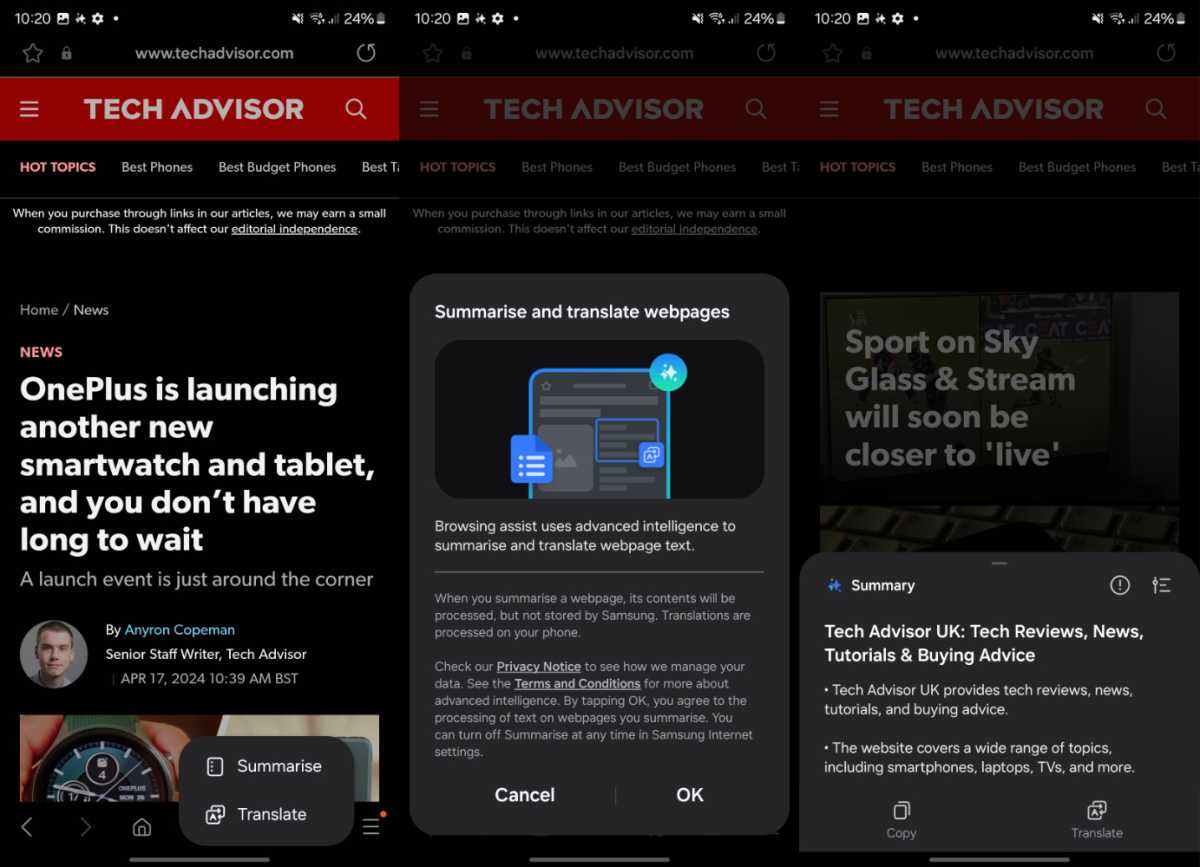
- Spot the Galaxy AI button (the star icon) smack in the middle of the toolbar at the bottom of your screen. Tap it and choose between Summarise and Translate .
- If this is your first time using the feature, you’ll see a pop-up window explaining how the features work. You’ll want to tap Ok and then choose Summarise . AI will then work its magic and create a summarised snippet of the article.
- Fancy a bit more detail? Opt for a Detailed summary. More of a bullet-point person? The Standard option’s your friend. Once your summary pops up, hit Copy to whisk it away to wherever you like.
Connor Jewiss / Foundry
Which devices does Galaxy AI Summarize work on?
Galaxy AI Summarize was initially exclusive to the Galaxy S24 series , but it’s was soon expanded to include lots more devices . Here’s the current list of compatible phones and tablets:
- Galaxy S22
- Galaxy S22+
- Galaxy S22 Ultra
- Galaxy S23
- Galaxy S23+
- Galaxy S23 Ultra
- Galaxy S23 FE
- Galaxy Z Fold 4
- Galaxy Z Fold 5
- Galaxy Z Flip 4
- Galaxy Z Flip 5
- Galaxy Tab S8
- Galaxy Tab S8+
- Galaxy Tab S8 Ultra
- Galaxy Tab S9
- Galaxy Tab S9+
- Galaxy Tab S9 Ultra
To get access, you’ll need to make sure your device is running One UI 6.1 or later.
How to summarise articles without a recent Samsung phone
Not got a compatible Samsung handset ? There are a few third-party apps that are able to summarise articles for you:
- Pocket : Great for saving articles to read later, Pocket also offers a text-to-speech function and a neat summary feature in its premium version.
- Instapaper : Another solid choice for saving articles, with a focus on a clean reading experience. Its premium version lets you search within articles, which is handy for zeroing in on key information.
- SMMRY : A web-based tool that’s free to use. Just paste your article URL or text, and SMMRY will trim it down to the essentials. It’s quick, easy, and doesn’t ask for much.
You may also be interested in how to use Circle to Search and real-time call translation , two other key Galaxy AI features .
Author: Connor Jewiss, Contributor, Tech Advisor

Connor is a technology writer and editor, with a byline on multiple platforms. He has been writing for around seven years now across the web and in print too. Connor has experience on most major platforms, though does hold a place in his heart for macOS, iOS/iPadOS, electric vehicles, and smartphone tech. Just like everyone else around here, he’s a fan of gadgets of all sorts. Aside from writing, Connor is involved in the startup scene, which puts him at the front of new and exciting tech - he is always on the lookout for innovative products.
Recent stories by Connor Jewiss:
- Oppo Reno 13 FS review: Well-priced battery champ
- Oppo Reno 13 Pro review: Camera-first mid-ranger that excels
- Samsung Galaxy A26 review: Budget phone that looks like a flagship
