Samsung’s Galaxy Z Flip 6 is one of the most interesting phones you can buy in 2024, but it has a major limitation.
By default, the cover screen can only be used to display a handful of Samsung’s own widgets, including Calendar, Reminders and Weather.
You can run some apps by heading to Settings > Advanced features > Labs and turning on the option for ‘Apps allowed on cover screen’. But at the time of writing, there are just five available: Google Maps, Google Messages, WhatsApp, Netflix and YouTube.
That’s a pretty poor selection, especially when Motorola’s Razr 50 Ultra/Razr+ (2024) can run any app you download from the Google Play Store.
However, the good news is that you can also run app on the Galaxy Z Flip 6 cover screen. Here’s the workaround method.
How to run any app on the Galaxy Z Flip 6 cover screen
Samsung might not recommend it, but it does offer a way to access any app without opening your phone. However, it’s a little complicated:
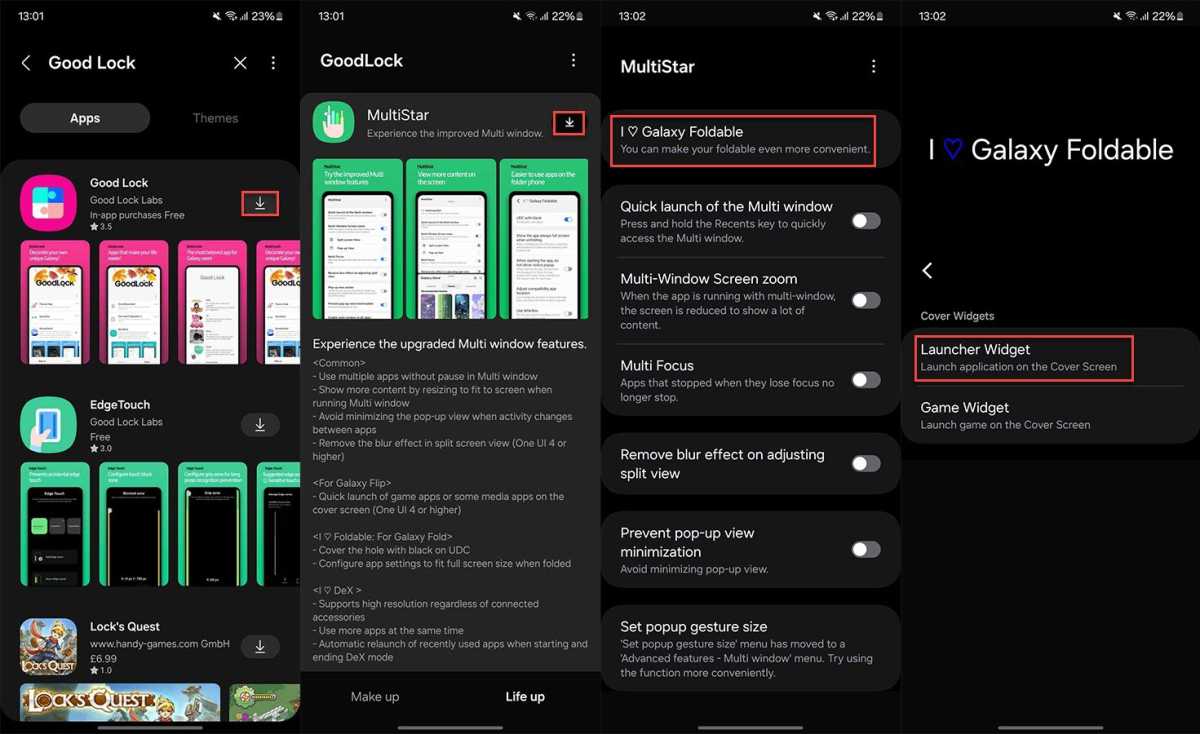
- Open the Galaxy Store app – it’s listed simply as ‘Store’ on the home screen and within the app drawer – and sign into your Samsung account if not already
- Search for and install the ‘Good Lock’ app by tapping the down arrow icon next to it
- Open the app, then tap the ‘Life up’ tab from the bottom of the screen
- Scroll down until you see ‘MultiStar’, then tap the down arrow icon followed by blue ‘Install’ button
- Once installed, head back to the ‘Life up’ tab, where ‘MultiStar’ should now be at the top. Tap to open it
- Select ‘I ♡ Galaxy Foldable’
- Select ‘Launcher Widget’
Anyron Copeman / Foundry
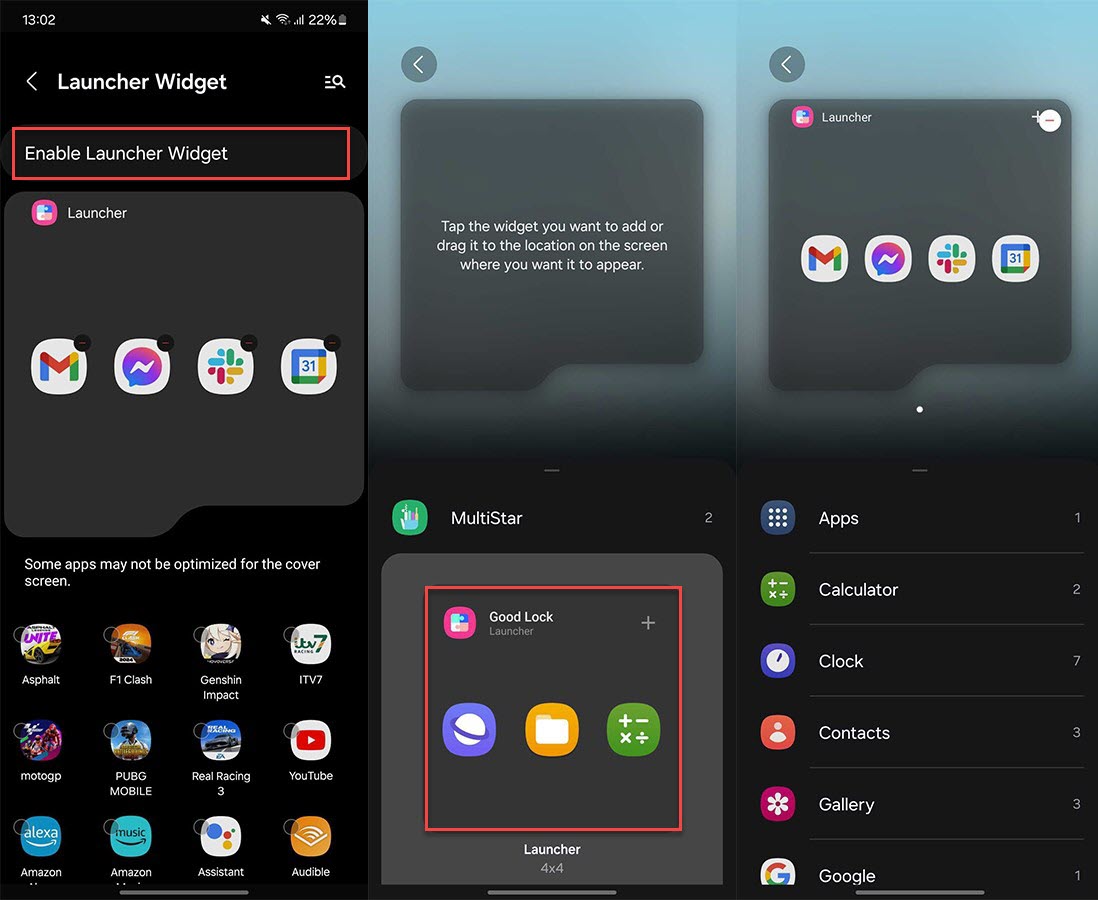
- Tap any app you want to add to the cover screen from the list
- Tap ‘Enable Launcher Widget’
- Tap ‘MultiStar’, then tap the ‘Good Lock Launcher’ to add it to the cover screen
Anyron Copeman / Foundry
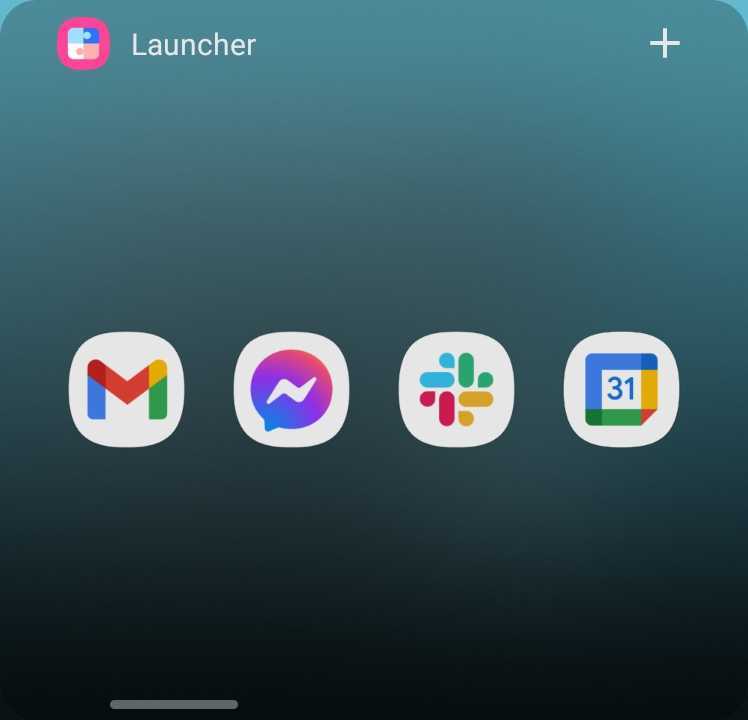
- That’s it! Close your device and unlock it, then swipe left until you find the ‘Launcher’ page. The icons for all the apps you chose to add will be shown here – tap to open any one
Anyron Copeman / Foundry
However, it’s worth noting that none of these apps have been optimised to run on the Z Flip 6’s cover display. As a result, there may be bugs or issues displaying some content, while the tiny on-screen keyboard can make typing difficult.
Even so, it makes the Flip 6 a far more capable device, and one that’s able to properly compete with the Razr 50 Ultra/Razr+ (2024).
Author: Anyron Copeman, Mobile Editor, Tech Advisor

Anyron is Mobile Editor at Tech Advisor, where he’s been a mainstay of the editorial team since 2019. In his current role, Anyron is responsible for all smartphone, tablet and mobile network coverage on the site. A BA Journalism graduate, he has experience with a wide range of consumer tech products and services, including smartphones, tablets, foldables, wearables and more.
Recent stories by Anyron Copeman:
- The truth: Android 17 won’t matter to most people
- I missed you, Pixel 10 Pro XL
- These are the best Xiaomi phones you can buy right now
