The streaming wars are entering a new phase where ads are the norm, just like in the classic days of terrestrial TV. Many platforms are introducing commercials to become more profitable, and ad-free streaming is becoming a thing of the past.
Currently, ads appear in all programs Prime Video offers, even in content for kids (as opposed to Disney+, where there are no ads on junior profiles .). But is there any method to get rid of them? Here’s what you need to know.
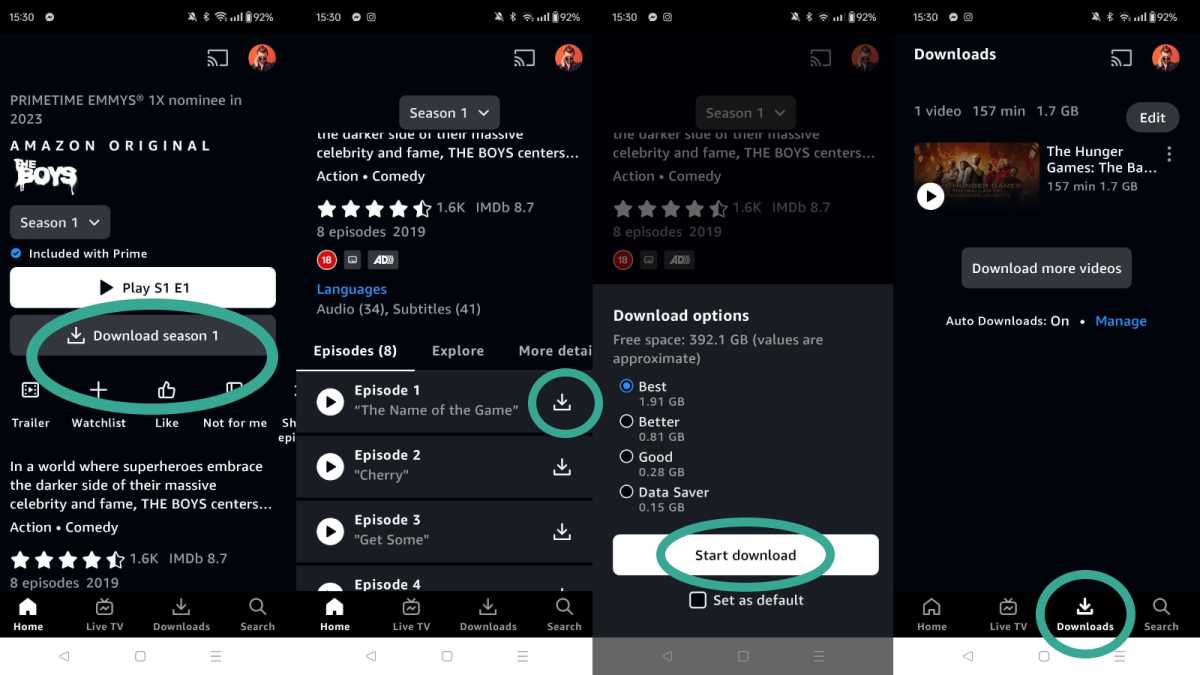
If you don’t want to pay for an additional subscription on top of Prime Video, then this workaround ensures that content is ad-free. All you need to do is download a movie or series, just as you would to watch something offline.
You can do this by clicking on the title of a series in the Prime Video app, and clicking the ‘Download’ button underneath the ‘Play’ button. If you choose a TV show, this will automatically offer the whole season to download. You can pick specific episodes by scrolling down and tapping the download icon next to the title of the episode.
Finally, choose your quality and hit ‘Start Downloads’. All your offline films and shows will be shown in the Downloads tab, and should play ad-free (they did when we tested).
Hannah Cowton / Foundry
In the US, a subscription costs $14.99 for full Prime and $8.99 for Prime Video only. This price has stayed the same, but ads have been included in the package as of Monday 29 January 2024.
Unfortunately, they can’t be blocked or skipped for free without additional hacks. To use Prime Video without ads, you need to purchase another subscription tier , which will cost you an additional $2.99 per month.
This can be cancelled at any time, should you change your mind.
The situation is the same in the UK. On Monday 5 February 2024 ads appeared as a part of a basic subscription, costing £8.99 per month for full Prime or £5.99 per month for just Prime Video.
The only way to get rid of them is to buy the package for an additional £2.99 per month.
Martyn Casserly
You can enable the ad-free subscription in your account settings.
In the browser version of Prime Video, go to Account & Settings and select Your Account . Click Go Ad Free and then Start Subscription .
In the Smart TV version of Prime Video, go to Settings and select Prime . Then select Go Ad Free and click Start Subscription.
“Customers in Puerto Rico, U.S. Virgin Islands, Guam, Mariana Islands, American Samoa, Republic of Ireland, Channel Islands, Isle of Man, Belgium, Netherlands, Luxembourg or Portugal are not currently seeing any advertising.”
Normally, we would recommend using a VPN to connect to a server in one of these countries to watch ad-free. However, we have debunked this workaround for Prime Video.
Nonetheless, ads appear less egregious. So, providing you’re not planning on watching more adult content such as The Boys or Fallout, then it may be worth using a Kids profile for your Prime Video content to encounter fewer breaks.
The more expensive Prime Video subscription will ensure that ads don’t play during movies and series. However, trailers may appear at the beginning of some programs, but it is possible to skip them.
Author: Weronika de Oliveira, Entertainment Writer, Tech Advisor

Weronika is an Entertainment Writer at Tech Advisor, where she covers topics related to TV shows, streaming, and movies. With an MA degree in Film Studies, her areas of expertise range from classical and postmodern cinema to contemporary films, series, and pop culture.
Recent stories by Weronika de Oliveira:
- Where to watch (earlier adaptations of) Wuthering Heights free
- A Knight of the Seven Kingdoms episode 4 will air earlier than you expect
- Javier Bardem follows Robert De Niro in this new Apple TV+ thriller series
