At a Glance
Expert’s Rating
Our Verdict
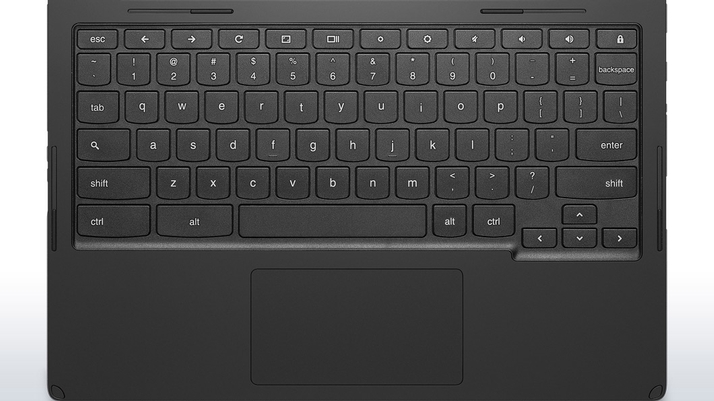
The Lenovo N20p is a bit of a disappointment. Visually it’s a very attractive, compact, and smart machine. The touchscreen is useful, and the specs make for a decent experience. This is all ruined by the poor keyboard which proved a Constant frustration. Fix that, and this would be a great device.
Best Prices Today: Lenovo N20p

Lenovo first introduced the idea of a laptop that could convert into a tablet style device, when it released the Yoga series a couple of years ago. Now this technology has found its way onto a Chromebook for the first time.
The idea is simple. Inside the chunky hinge is a mechanism that allows the screen to fold back three hundred degrees, essentially turning it into a freestanding display (held in place by the upside down keyboard laid out behind). The keyboard is also disabled when in this mode, to avoid any random keypresses. In theory this is a cool way to make a laptop more tablet-like, and is presumably intended for when you want to watch videos or use the device in presentations.
A few flies find their way into the ointment though, due to the simple fact that a) the normal laptop setting also allows the screen to sit up unaided; and more tellingly b) you’re suddenly reduced to onscreen controls for volume, which on the YouTube app equates to some kind of sadistic torture. The screen itself is bright and reasonably colourful. We’ve noticed that touchscreen models seem to have a bit more life in them than their rather dulled counterparts, although the 1366×768 resolution remains a constant across the Chromebook range.

The touchscreen, as we found when we reviewed the Acer C720p, is a positive feature. With Chromebooks being such internet focused machines, the user experience makes sense straight away. There are no hidden Charms bar to find or new menus to contend with, instead you just browse the internet in a normal fashion, but tap on the screen when you want to select an option. Simple, easy, actually useful. In operation the screen is responsive to finger gestures, with resizing happening swiftly and with no noticeable lag. It might seem like a luxury on a Chromebook, but it’s a really handy option, especially in the rather odd Yoga mode.
Chromebooks are much of a muchness internally these days, and the N20p is no exception except where the memory is concerned. Most models feature a modest 2GB of RAM, but this device packs double that. It does seem to give the system a subtle boost in terms of speed, but it’s marginal and of course heavily influenced by the speed of your internet connection.
Eschewing the previous trend of ARM processors, Lenovo has opted to fit a 2.16GHz Intel Celeron N2830, which belongs to the Bay Trail family of CPUs. These are known to be energy efficient chips, which proves to be true with the N20p lasting for seven and half hours in our looped movie test. In Sunspider, the N20p wasn’t amazingly fast with a result of 807ns. It was a similar story in our other browser benchmarks, with 1318 in Peacekeeper, and 2186 in Browsermark.
Storage is still small, with a 16GB SSD nestled inside, but in standard fashion Google gives you 100GB of free Google Drive space for two years when you register your new machine.
Specs
Lenovo N20p: Specs
- 11.6″ 1366×768 glossy TN touchscreen display
- 2.16GHz dual-core Intel Celeron N2830 Processor
- Intel HD graphics
- 16GB SSD
- 4GB DDR3 RAM
- 1x USB 2.0, 1x USB 3.0
- Mini HDMI output
- SD card slot
- 720p webcam
- Bluetooth 4.0
- 3.5mm headphone minijack
- Dimensions: 17x279x211mm
- Weight: 1.4kg
- Tested battery life: 7hrs 33 mins
Best Prices Today: Lenovo N20p
Author: Martyn Casserly, Contributor, Tech Advisor

Martyn has been involved with tech ever since the arrival of his ZX Spectrum back in the early 80s. He covers iOS, Android, Windows and macOS, writing tutorials, buying guides and reviews.
Recent stories by Martyn Casserly:
- You can now buy Microsoft Office 2024 on Amazon without a 365 subscription
- How to get a Samsung student discount
- Why I buy refurbished tech over used
