At a glance
Expert’s Rating
Pros
- Simple interface
- Intuitive remote
- Wide range of apps
- Cheaper than some other 4K media boxes
Cons
- No Dolby Vision or Atmos
- Limited smart home integration
- No HDMI extender
Our Verdict
If all you want is a media box that can give you 4K content, the Roku Streaming Stick Plus will meet your needs – and it plugs directly into the back of your TV. However, if you want a wider range of features, you’ll need to buy something pricier.
Price When Reviewed
This value will show the geolocated pricing text for product undefined
Best Pricing Today
Best Prices Today: Roku Streaming Stick Plus

While most smart TVs offer streaming apps such as Netflix and BBC iPlayer out of the box, not every manufacturer has everything you want on offer at launch. Plus, if you have an older telly, you may be missing out on some key options. That’s where a streaming stick comes in useful.
Roku is one of the more affordable brands on the market, but it still boasts a wide range of apps, a simple user interface and a handy remote.
Design & Build
- Stick design that plugs directly into the TV
- Can use the TV’s USB port for power
- Roku remote remains a great option
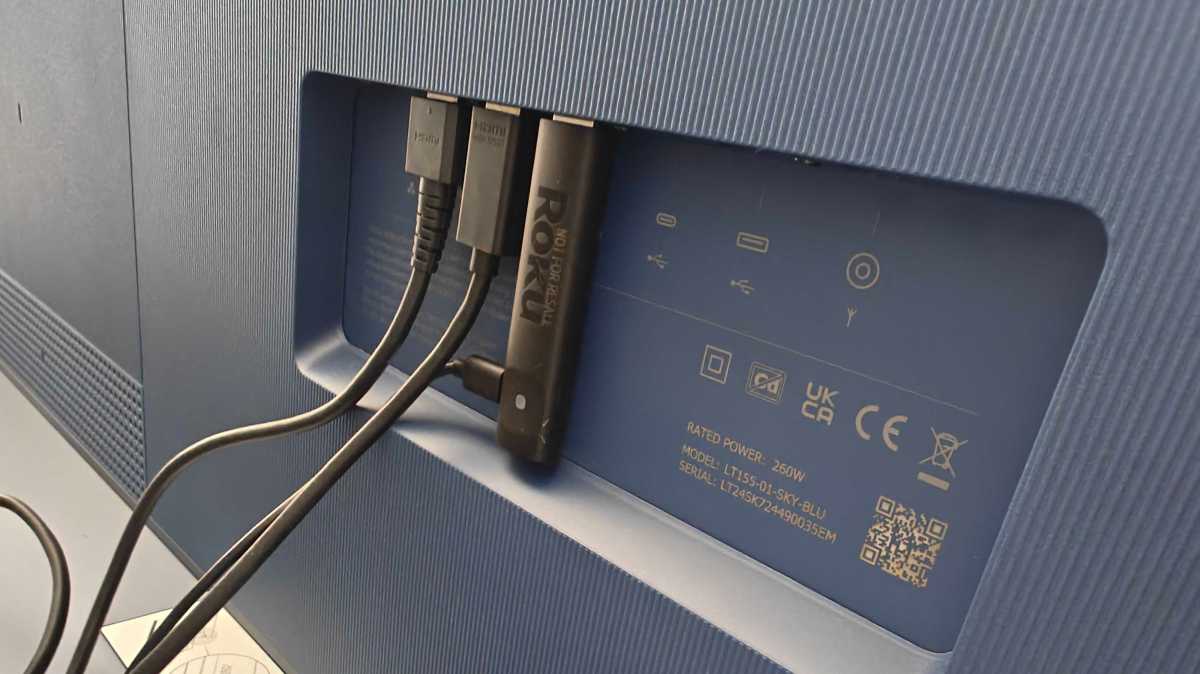
Roku has made a design change to its latest 4K device, opting for a streaming stick build rather than a box that attaches to your TV via an HDMI cable. That essentially means it can plug into the back of your TV and makes the problem of having a device awkwardly hanging down obsolete.
The design is an upgrade from the Roku Express 4K , which this device essentially replaces.
Hannah Cowton-Barnes / Foundry
It’s extremely light and portable – ideal to take with you if you’re travelling and want to use this on other TVs. There is a USB-C port on the side so you can connect it to an external power source, while a status light indicates whether the stick is properly connected.
Note that no power brick is included, though. As the Streaming Stick uses low power consumption, the cable can plug directly into your TV’s USB port to avoid the need for an outlet nearby. You can still use your own brick if you prefer – my cable just about reached the socket on the floor during testing.
While the design is like a Fire TV Stick, it’s missing some key elements that you’ll find on the Google TV Streamer, such as an ethernet port, but that is reflected in the price, with this device being available at a much more accessible cost. There is also no HDMI cable in the box, but that’s pretty standard.
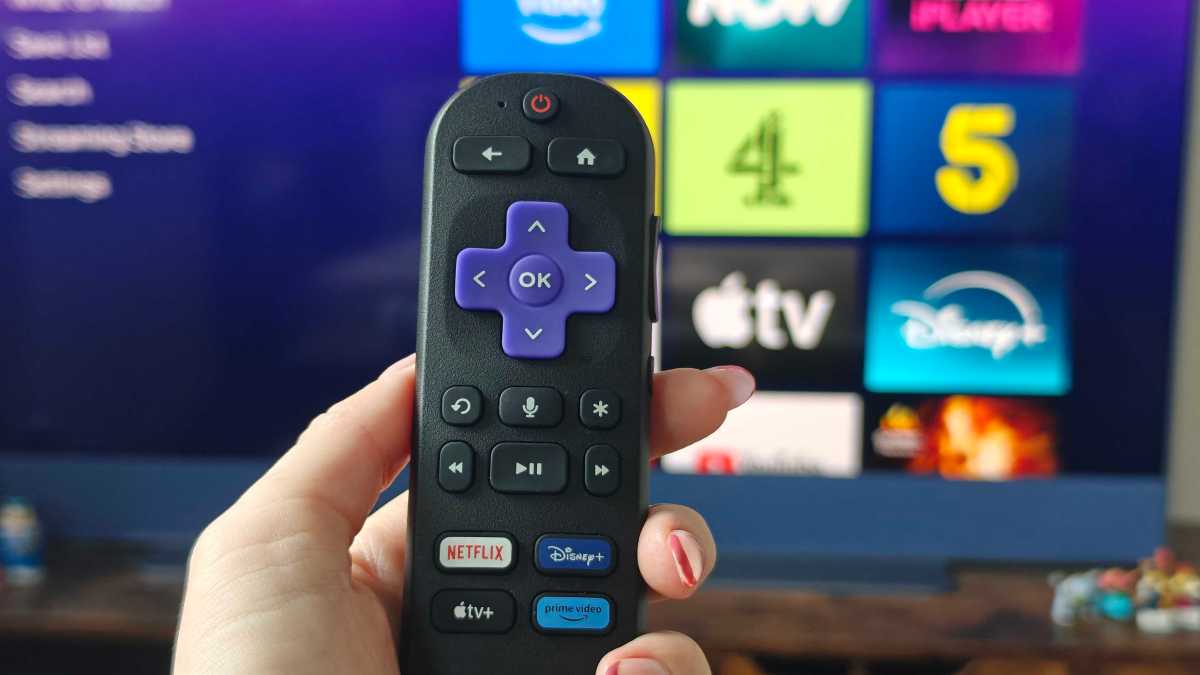
Alongside the Stick Plus is the Roku remote, which is very similar to past iterations from the brand. It’s pill-shaped, with colourful, large protruding buttons, handy for those with visual impairments. There is a power button on the top and volume controls on the side, which can be synced up to your TV to turn it on and off and adjust basic audio levels.
The star (*) button gives you quick access to settings, while the microphone button activates voice control, with the microphone located discreetly on the top of the remote. AAA batteries are included as standard, and you can also use the Roku app as a remote control if you prefer.
Specs & Set-Up
- 4K, HDR support
- No Dolby Vision or Atmos
- Simple set-up
Roku doesn’t disclose the processor fitted inside the Streaming Stick Plus, but it’s zippy enough when booting it up and clicking around the homepage. Wi-Fi 5 support is included, which is a little outdated by today’s standards.
As mentioned above, this device can stream in 4K, with support for HDR10, HDR10+ and HLG. You’ll notice that Dolby Vision is missing from that list. If you want that, you’ll have to upgrade to the Roku Streaming Stick 4K . Atmos audio support also doesn’t come as standard.
This won’t be much of an issue if you don’t use content that’s playable in this format – for Netflix and Disney+, only certain films and TV shows have it, and you’ll need a Premium streaming subscription to access these features. If you don’t have that, then you shouldn’t miss out too much on the lack of Atmos support.
Hannah Cowton-Barnes / Foundry
If you’ve never used a Roku before, then rest assured that setting one up is very easy to do.
Once you’ve unboxed it and plugged it into your TV, ensure that the status light is on and open the HDMI source your device is plugged into (often known as ‘Source’). Some TVs may even recognise it immediately and send you straight there.
The Roku will then guide you through a series of instructions to pair your remote. Once that’s done, connect to your Wi-Fi network and wait for any software updates.
You’ll then have the option to sync power and volume controls. If this doesn’t work immediately, don’t worry – you can do further testing once you’re all set up. Finally, the TV will prompt you to either sign in or create a Roku account. If you owned an older device, signing in with this email will allow your device to remember some of your logins and watch history (though not all).
Software, Compatibility & Performance
- Large tiles for apps
- Not overloaded with ads
- ‘What to Watch’ needs refining
- Not many smart home controls
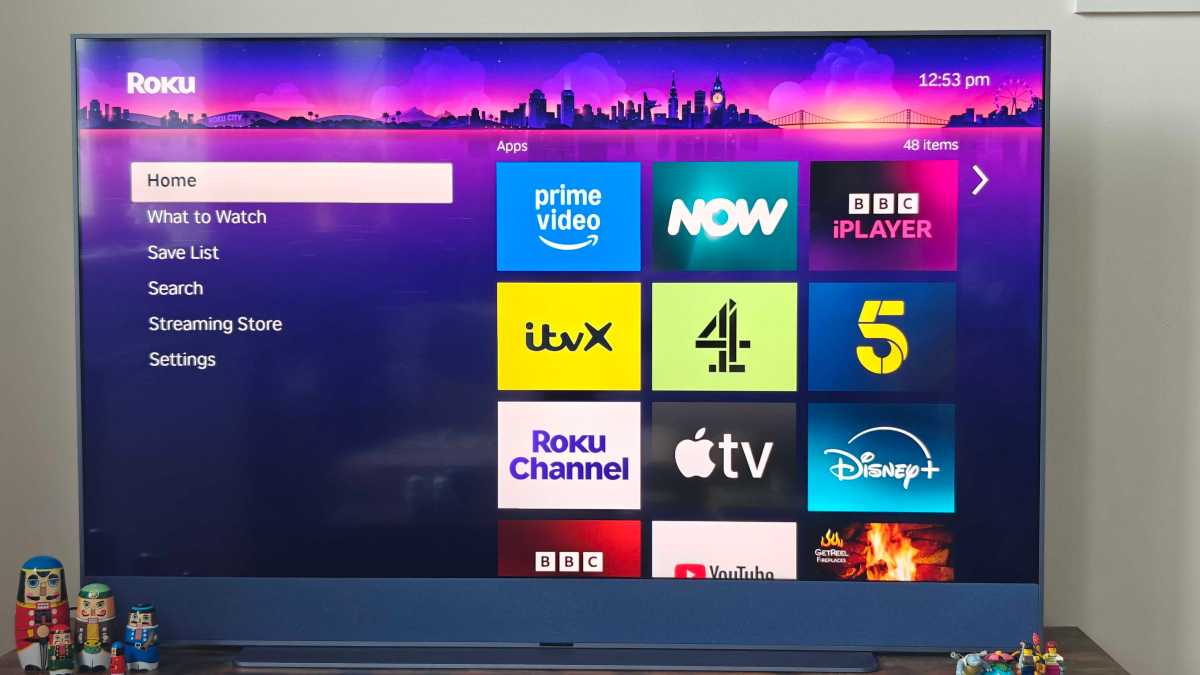
Roku keeps things simple and stripped back for its interface. The homepage is decked out in the signature Roku purple theme (though this is customisable), while the right-hand side has six categories in the menu.
On the homepage are all your apps, which are in big tiles that are easy to view. And ads on the homepage are way less oppressive than what you’ll find on the Fire TV sticks.
For new content recommendations, ‘What to Watch’ suggests new TV shows and movies based on both your unique algorithm and trending content. I’d say compared to streaming apps, these options don’t seem quite as tailored to my tastes, but I rarely use this section beyond the Continue Watching rail.
Hannah Cowton-Barnes / Foundry
I’d say this rail could do with some refining, as not every show and film I have on the go syncs on the rail. For example, I started watching Guardians of the Galaxy on ITVX, and this didn’t then appear in that section.
‘Save List’ includes any content you’ve marked to watch later, while the search bar does what it says on the tin: giving you a place to look for something directly. Of course, it’s much easier to use voice control for this. Roku remotes are quite intuitive at picking up my commands, and you can even search by terms such as actors’ names, like ‘Robert Downey Jr’.
The ‘Streaming Store’ includes apps you may not have installed, plus premium movies to buy on VOD, such as A Minecraft Movie and Wicked. Finally, the Settings menu allows you to test the settings on your remote, configure your display and audio, set up accessibility features and add payment methods.
There’s also support for Apple AirPlay and HomeKit, and the devices work with Google Home and Alexa. However, these controls are limited to Roku devices only. The Google TV Streamer (and even Chromecast) has a smart home bar that can be used to control lights, thermostats and more.
American users do have some integration with Roku-branded products , but these aren’t available in the UK. Plus even then, it can’t support third-party products such as Nanoleaf lights like the Google TV Streamer can.
The app selection on Roku is decent. Alongside global platforms such as Netflix, Prime Video and Disney+, UK viewers get BBC iPlayer , Now, ITVX and Channel 4 , while US owners have access to Hulu, HBO Max and Peacock. There’s also plenty of free content to browse via The Roku Channel and Pluto TV.
Twitch has even been added now, and there’s nothing major that’s missing, as was the case when the Google TV Streamer first launched without BBC iPlayer. There are even a few games, such as Tic Tac Toe, and ‘Pacmouse’ – guess which popular game the latter is a dupe of.
Price & Availability
The Roku Streaming Stick Plus costs £39.99/$39.99, making it an affordable media box to get 4K content on. Roku devices also often receive decent discounts during sale seasons such as Black Friday, in my experience working the sales hell for nearly six years.
Both these devices have a larger range of smart home controls, so if you like to adjust your lights, thermostats or get picture-in-picture doorbell feeds on your TV, one of these devices may suit you better (unless you’re in the US and happy to be in Roku’s ecosystem only).
If Dolby Vision is a priority but you want to stick with Roku’s interface, you can instead opt for the Roku Streaming Stick 4K (£49.99/$49.99), which is the same price as the Fire TV Stick 4K, but does still lack Dolby Atmos support.
You can see further options in our guide to the best streaming sticks and media boxes .
Should you buy the Roku Streaming Stick Plus?
For simple 4K streaming, the Roku Streaming Stick Plus is a strong choice. It undercuts key rivals, yet still offers a user-friendly interface and a wide range of apps to boot. The buttons and voice controls are also some of the most accessible on the market.
It would have been nice if Roku included an HDMI extender in the box, but for many people, this new Streaming Stick Plus will be everything you need for watching your favourite shows and films in crystal-clear 4K.
Specs
- Roku TV OS
- HDMI output up to 4K @60fps
- HDR, HDR10+
- USB-C for power
- 802.11ac Wi-Fi (2.4 GHz/5 GHz)
- Remote control with voice assistant
- Remote dimensions: 3.7 x 0.80 x .45 inches
Best Prices Today: Roku Streaming Stick Plus
Author: Hannah Cowton-Barnes, Entertainment Editor, Tech Advisor

As Tech Advisor’s Entertainment Editor, Hannah is the resident expert in all things streaming, film and TV. Before joining Tech Advisor in 2019, she studied Theatre and Performance at the University of Leeds and created a website dedicated to geek culture and lifestyle. She’s also reviewed a whole range of gadgets including flagship smartphones, wearables and styling tools. Outside of Foundry, she’s written freelance pieces for Polygon, Metro and Den of Geek, and is proud to be a Women Techmakers Ambassador for Google.
Recent stories by Hannah Cowton-Barnes:
- Best HDMI cables for 2026: Our top picks
- Sky has discontinued online sales of Sky Q… but will yours stop working?
- Chromecasts and Google TV Streamers are now missing a key Netflix feature
