At a Glance
Expert’s Rating
Our Verdict
The TP-Link M5360 provides an easy way to set up a portable 3G hotspot. At £58 it is good value Considering £50 is a typical price for a 3G portable hotspot with a small battery. However the only cause for pause is whether you want the speed of a 4G alternative which range from £70-150 depending on make and network.
Best Prices Today: TP-Link M5360


The M5360 supports the connection of up to 10 wireless devices simultaneously. But what differentiates this 3G Wi-Fi router from most similar devices is the decent-sized 19.2 Wh lithium-ion battery. TP-Link even fits a female USB port that can provide 5V with 1A of power for other devices. Used as just a 3G router battery life is a claimed 17 hours, and there’s sufficient power to recharge an iPhone or iPad (albeit not a full charge for the iPad).
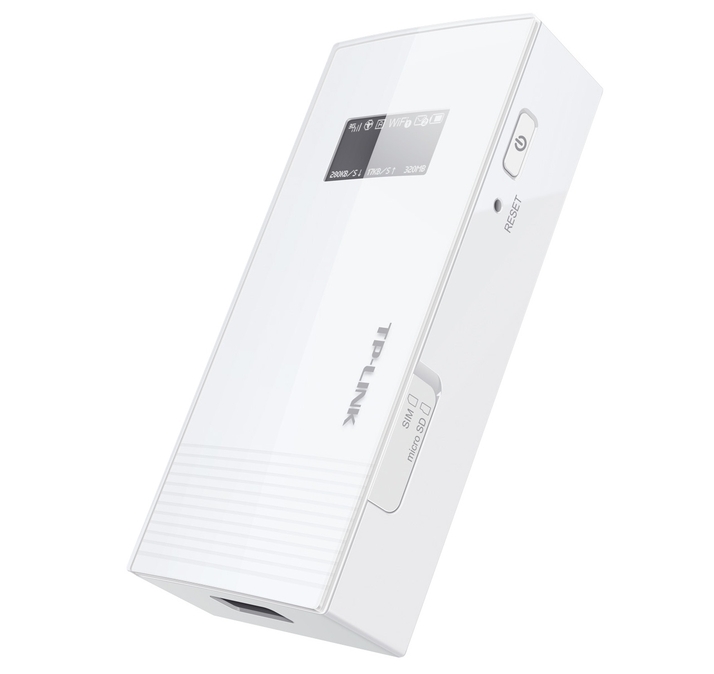
The device is compact at just 100 mm tall, and the build quality is satisfactory, assembled from hard white plastic. The battery is sealed inside and not designed to be user replaceable.
There are only two buttons – on/off and a recessed reset button. On one side are card trays for a regular (mini) SIM and a microSD card. If you have a micro- or nano-SIM, you can use the provided adaptors. It’s worth checking that your cellphone network allows you to use your SIM in such devices. Many SIM plans block the use of a smartphone SIM in a tablet or 3G router.
On the front of the unit is a small backlit LCD screen which contains basic connection and battery-status information.
To test this device we used a Three 3G SIM pre-loaded with 12 GB of data. No setup was required – we simply inserted the SIM card and the hotspot was active and connected to the internet.

he Wi-Fi security key is handily written on the device and the M5360’s settings can be changed by pointing your browser to the admin webpage at 192.168.0.1. (See all Wi-Fi and networking reviews .)
TP-Link M5360: 3G performance
For the first test the device was placed on a table (indicated signal strength 4-5/5) and we connected wirelessly to it with a Macbook Pro 17in (Early 2011).
The laptop ran 10 internet speed tests using speedtest.net, the same process was carried out with an iPhone 4s using a Three SIM on the One Plan (unlimited data).
From the TP-Link M5360 we saw an average speed of 2.53 Mb/s down and 0.69 Mb/s up, while the iPhone 4s managed 2.09 Mb/s down and 1.23 Mb/s up.
Given the high variability of the speeds in the 10 trials and the fact that both devices reached speeds over 4 Mb/s down and 1.6 Mb/s we decided to call this test a draw.
The same test was carried out again in a higher signal strength area (5/5 indicated) over five trials and the results were very similar – M5360 averaged 2.33 Mb/s down, 0.61 Mb/s up, and iPhone 4s 2.73 Mb/s down, 0.67 Mb/s up. (See all broadband tips .)
TP-Link M5360: Wi-Fi performance
To test the Wi-Fi broadcast capabilities of this device two Macbook Pro laptops (15in 2008 and 17in 2011) were connected and placed 3 m from the M5360 and each other. An iPerf TCP speed test was carried out to determine maximum Wi-Fi throughput.
Specs
TP-Link M5360: Specs
- 2.4 GHz 3G cellular Wi-Fi router
- OLED monochrome display
- microSDHC card slot
- micro- to mini-SIM adaptor
- nano- to mini-SIM adaptor
- Micro-USB port for charging
- mains charger with USB power outlet
- Micro-USB cable
- USB 5V/1A charging port
- HSPA+ / HSPA / UTMS / EDGE / GPRS
- 19.2 Wh (3.7 V, 5200 mAh) lithium-ion battery
- 100 x 44 x 28 mm
- 156 g
Best Prices Today: TP-Link M5360
