
At a Glance
Expert’s Rating
Pros
- Screen doubles as rear-view mirror
- Rear cam can also work as reverse cam
- Great video quality
Cons
- Expensive
- Clunky interface
- Can be difficult to install
Our Verdict
The Vantrue M2 could use a bit of TLC on the software side, but the hardware is near faultless and the ability to use the rear camera as a reverse parking camera is a very handy bonus.
Best Prices Today: Vantrue M2

Dash cams come in all shapes and sizes and that’s certainly true of the Vantrue M2. It’s unlike others we’ve reviewed because it mounts on your car’s rear-view mirror and comes with a rear-facing camera that can double as a reversing camera – handy if your car doesn’t already have one.
Plus, the fact the M2 hangs off your rear-view mirror makes it harder to spot than a standard dash cam, and these things – plus a few other tricks – make it worth the premium price.
Are you ready to ditch your rear-view mirror for a smart one? Then read on.
Design & installation
The Vantrue M2 is designed to clip onto your existing rear-view mirror and display the live feed from the rear camera – a 21st-century spin on the rear-view mirror, if you will. Though it sounds complicated, it takes no more than 10 seconds to secure it into place using grippy rubber straps.
The device’s touchscreen measures 12 inches across, making it bigger than most cars’ rear-view mirrors, and this was the case with my 2016 Vauxhall Corsa. It’s not so big that it obscured my vision when driving, though.

Importantly, it still does the job of your rear-view mirror when the screen is off: it’s a little dimmer than a standard mirror, likely due to the anti-glare coating which is designed to minimise reflections. It’ll does the job, but it’s not quite as good as a standard mirror.
The extra width of the rear-view mirror is required so the 1440p 148° camera can get a view of the road ahead. The angle can be adjusted, although the range of motion is fairly limited. Still, as long as it’s perpendicular to the road, you’ll have no issues.

The main unit plugs into your car’s 12V socket as most dash cams do, but Vantrue insists that you use the supplied cable and charger and not one that you might’ve been using with another dash cam.
Unusually, there’s a separate GPS receiver that plugs into the main unit, and this is designed to sit on your dashboard.
The Vantrue M2 can serve simply as a front-facing camera using the built-in camera, but it comes with a 1080p rear-facing camera. This small rear camera connects via a long USB cable and can be affixed to the interior of the car using the adhesive strip supplied, but it can also be installed on the exterior of the car where a reversing camera would usually live.

This is easier on certain cars, such as my Vauxhall Corsa, where the registration plate is mounted in the rear bumper. But if it’s on a hatchback or boot lid (tailgate), then routing the wires becomes a lot more difficult.
Note that you also need to connect a wire to the reverse light of your car in order to automatically activate the rear camera feed on-screen when you put the car into reverse. This also displays reverse parking guidelines. Installation is a little too involved for most people, but a local garage will install it for around £70 / $90.
Features
When the unit powers on, you should see your rear camera feed along with key information such as time and speed, visible in the top-right of the display.
The 12in anti-glare IPS display is bright in use, utilising the rear-view camera to provide a rear-facing view unobstructed by the interior of the car. The 140° field of view is ideal, helping you to stay aware of cyclists and bikers in your blind spots as you’re driving.

Because of ultra-wide aspect ratio of the screen, you can swipe the display to move the view up or down depending on your preference – although never do this while in control of a moving car, of course. You’ve also got the option to automatically turn the display off after a few minutes, and you can turn it off manually via a button on the underside of the mirror if it becomes distracting.
Via a series of swipes and taps on the display, you can switch to a view of what the front-facing camera is capturing (perfect for getting the angle right during setup) or displaying both side-by-side.
There can be a bit of lag when navigating the various menus, and there’s some stutter when scrolling, but you that’s not something you need to do too often. Once everything is set up to your liking, you’ll rarely need to interact with it. I just wish the whole thing was a bit easier to navigate, with settings hidden away in obscure menus that should be easier to access.

It’s when you connect the rear-facing camera to your car’s reverse light wire that the Vantrue M2 truly shines. The mirror will automatically switch to the rear-view camera when you put the car in reverse. What’s more, it’ll automatically adjust the angle of the view to see more of the kerb behind you, and it’ll overlay parking guidelines to help guide you into place.
The guidelines are a great addition that can really help gauge spaces while reversing, but I wish the setup was more intuitive. As with other reverse cameras, the software doesn’t know the dimensions of your car and displays generic markings to give you a rough idea of distance. It’s down to you to adjust the shape and size to match your car.
Though it’s a bit of a pain, it is doable – I just wish that all the buttons used to adjust it were easier to understand, or better yet, the markings could be adjusted by moving them with your fingers.

Of course, the Vantrue M2 has many of the features you’d expect from any dash cam including a G-sensor that’ll automatically lock recordings to prevent them being overwritten in the case of an imapct, a built-in microphone to record audio and a parking mode.
The only big omission is a companion app for smartphones; the Vantrue M2 doesn’t have is a mobile app. If you want to review recorded footage, you can do this – awkwardly – on the display itself, but to share the footage, you’ll have to eject the microSD card and plug it into a PC or Mac.
There is a Vantrue app for PC and Mac that’s quite basic in design, but like most similar software for dash cams, you can browse through the clips and they’ll play as well as showing telemetry data like GPS coordinates and speed – ideal for insurance claims.

Video quality
The most important factor is, of course, video quality. Fortunately there aren’t any huge disappointments in that department. The 1440p front-facing camera and 1080p rear-facing camera perform fairly well in most situations.
Let’s start with daylight; as you’d expect, both the front- and rear-facing cameras excel in well-lit environments during the day. There’s balanced colour, and the detail is impressive – just be sure to clean your windscreen first!

Front camera during the day
Regardless of the camera, you’re able to pause the video at any moment and pick out finer details like car registration plates from almost any angle – a benefit to using Sony’s Starvis sensor in both cameras.

Rear camera during the day
It’s typically at night that dashcams begin to struggle, and while it’s not quite as good-looking as during daylight, the Vantrue M2 handles low-light environments very well – another benefit to using Sony’s sensors.
The front-facing camera retains more light than expected on dimmer roads, with noticeable detail and a well-tuned noise reduction system that leaves videos looking largely crisp. The issue is that bright headlights can – and often do – blow out the registration plate of oncoming vehicles due to the reflective nature of plates in the UK.

Front camera during the night
Though the rear camera drops to 1080p, you should expect a similar level of impressive performance. The drop in quality is more noticeable at night with noise reduction tech working a little too hard, but it offers great dynamic range and a clear, smooth image.

Rear camera during the night
It’s worth noting that, unlike much of the premium competition, the frame rate is capped at 30fps – likely to retain that impressive low-light performance. That’s fine for those that want to use the camera for insurance purposes, but it does limit the quality of videos recorded for other purposes, especially when compared to the likes of the 120fps Nextbase 622GW .
The bigger annoyance for some will be the format it uses; rather than the easily shared MP4, files are encoded in a .ts format. It makes sense as it encodes other data – including telemetry data – into the file, making it easier to view on a PC or Mac, and it saves files from being corrupted if power is lost during recording, but it’s difficult to convert into an MP4 without the use of third-party software.
Here’s a sample of clips taken from the Vantrue M2:
Price & availability
If you’re on the hunt for something a little different, our selection of the best dash cams might point you in the right direction.

Verdict
The Vantrue M2 isn’t an ordinary dash cam, but that’s what makes it compelling. Mounting to your car’s rear-view mirror is easy and means it doesn’t obstruct your view of the road, or get in the way of the sun visors. It’s the first dash cam we’ve seen where the rear-facing camera can double up as a reversing camera – this is a real bonus, particularly if you struggle with parking.
Importantly, both cameras capture detailed video during the day and are even decent at night. Though, they suffer from the same issue all dash cams have with reflective license plates blowing out at night.
The bigger problems for some will be the .ts file format, which makes it difficult to share clips with others, and the fact that there isn’t an accompanying app for iOS and Android to easily access files.
Still, if you can get over that, and the relatively high price, the Vantrue M2 is a great dash cam that offers something truly different from the competition.
Specs
Vantrue M2: Specs
- 12in IPS anti-glare display (1920 x 480)
- Front-facing 148-degree 1440p camera (f/1.55)
- Rear-facing 140-degree 1080p camera (f/1.8)
- Sony Starvis sensors with night vision & HDR
- Adjustable reverse guide lines (optional)
- Supercapacitor
- G-Sensor
- Parking monitor
- Built-in mic and speaker
- Supports up to 512GB microSD card
- TS video format
- Vantrue app for PC and Mac
Best Prices Today: Vantrue M2
Author: Lewis Painter, Contributor, Tech Advisor

Lewis Painter was once a Tech Advisor Senior Staff Writer. He covers everything from iPhone to AirPods, plus a range of smartphones, tablets, laptops and gaming hardware.
Recent stories by Lewis Painter:
- Z-Edge Z3D dash cam review
- MiVue C330 dashcam review
At a Glance
Expert’s Rating
Pros
- Lots of detail
- Emergency SOS
- Alexa
Cons
- Expensive
- Colour accuracy
Our Verdict
Expensive, but packed with features and offering detailed video quality.
Best Prices Today: Nextbase 622GW
Nextbase took its time to launch the 622GW: almost a year after the rest of the range. But it’s here now and it is literally packed with features.
On top of the 522GW, it has that higher 4K resolution, image stabilisation, extreme weather mode and what3words, to make it easier to tell the emergency services exactly where you are.
Like the 522GW, you can connect one of the three rear camera modules that Nextbase offers and turn it into a front-plus-rear dash cam which records footage to in sync to the same microSD card, which isn’t supplied. The 622GW also has Alexa built-in along with the Emergency SOS service, which is free for the first year, then you have to pay a small subscription fee.

It also shares quite a lot of other similar features to the 522GW: a touchscreen interface, the MyNextbase companion app, a magnetic quick-release mounting system and a big ‘ol lens barrel poking out the front with a polariser on it.
Design
Just like other models in the range, the 622GW shares a similar, traditional dash cam design with a large 3in screen on the rear which sits perpendicular to the road. That means it doesn’t hug the windscreen and keep out of the way of sun visors as well as the Viofo A129 Duo, for example, but the magnetic mount that attaches next to the lens does make it more compact overall than many dash cams.

The mount houses the GPS receiver and there are two options here: suction or adhesive. The latter is preferable as suction mounts tend to fall off from time to time, whereas the 3M adhesive is tough to get off even when you need to remove it from the windscreen.
Installation is straightforward if you’re using the bundled cable that plugs into a 12V socket somewhere on your dashboard or centre console, but it’s much neater to go with the hardwire kit that you can either install yourself or pay Halfords or another supplier to fit for you.
The kit isn’t required for the intelligent parking mode, which uses the camera’s own battery power to monitor the G-sensor for movement and record when your car is hit.
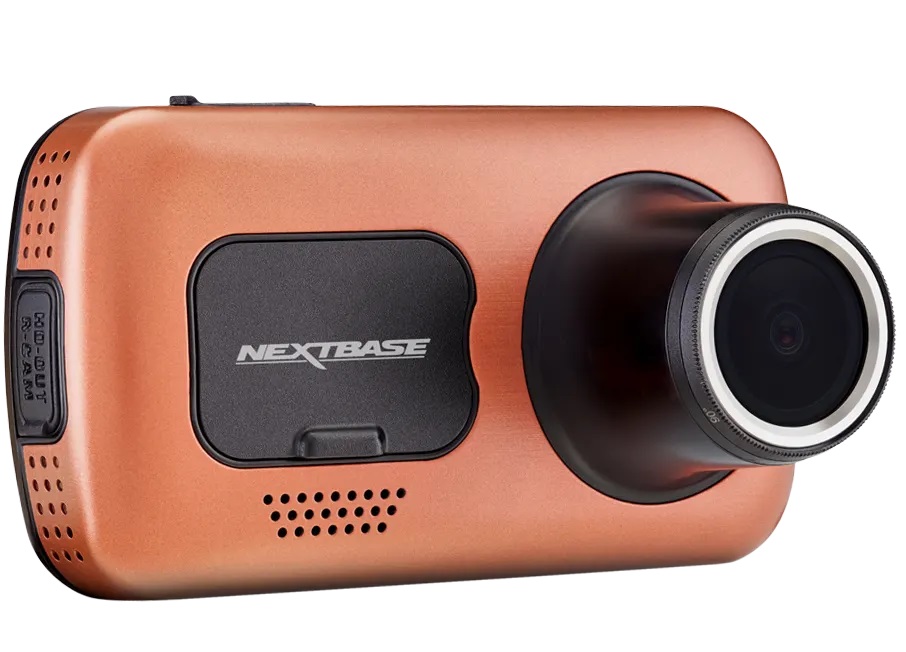
Nextbase now offers a Limited Edition 622GW Sienna version which sports a burnt orange colour, with 5% of profits being donated to MS Society UK.
4K video
The headline feature, of course, is the 4K video. It records at 3840 x 2160 pixels at 30 frames per second. This is considerably more than the 2560 x 1440 pixels that the 522GW is capable of and image quality is further improved by digital stabilisation. Strangely, this is disabled by default, as is the new extreme weather mode which can ‘see through fog’.
Aside from what appeared to be a failure of the white balance system that resulted in colours appearing far too warm, quality is impressive.

Pause a video and you should be able to make out registration plates just about anywhere in the frame: on cars driving past, in front of you, parked by the side of the road or even those waiting in a side road waiting to pull out.

The new sensor’s larger pixels definitely contribute to better quality at night, as video is noticeably sharper than any previous Nextbase dash cam and there’s a lot more detail and better contrast.

You’ll still struggle to see registration plates, but that’s partly because of their reflective nature in the UK which means they turn white when your car’s headlights shine on them. The fact you can see some blurry characters on this van’s plate is quite remarkable.

For those who like the technical details, 4K video is recorded in MP4 at a variable bitrate. Some files showed a total bitrate of under 50Mbps, while others approached 60Mbps. Audio is pretty good, recorded in stereo at 512kbps at 16kHz. You can turn off audio recording, but unlike other dash cams which have a button for this, you have to dig into the 622GW’s video settings menu to do it.
It’s worth noting that you have to set the resolution to 1080p if you want to use the 120fps slo-mo mode: you can’t review 4K footage at that frame rate.
If you connect a rear camera to the 622GW it will still record at 4K, but all rear modules are limited to 1080p.
Here’s the full-resolution night-time clip:
MyNextbase app

When connected to the 622GW’s Wi-Fi, you can see the view from the lens, change settings and also review recorded video clips. Downloading the 400MB that a one-minute clip demands is surprisingly quick over Wi-Fi (running at about 20Mbps to my Huawei P30 Pro), so while I could complain that there’s still no way to trim clips or pick which few seconds of a clip I actually need, download the full minute is do-able even in 4K.
The low-res preview files are enabled by default but, again, you can disable these if you don’t want them taking up space on your memory card.
Price & availability
Although the 622GW will cost you £249.99 from Halfords , that’s the same price its predecessor, the 612GW, cost.
In the US, Nextbase dash cams are much more expensive, and the 622GW will set you back $399 from Best Buy .
In the UK, you can buy a rear camera for £49, but in the US they’re $99.99, making the total front-plus-rear package a whopping $500.
For cheaper alternatives, see our roundup of the best dash cams .
Verdict
The 622GW certainly lives up to its flagship status, both in price and features. If you want the absolute best, this is it. There’s great image quality both day and (relatively speaking) at night.
You also get some genuinely useful safety features including what3words which, when enabled and there’s GPS reception, lets you press the shortcut icon on the screen to get your precise location in a format that couldn’t be easier to relay to emergency services over the phone. The SOS feature goes further and informs them of your whereabouts if you remain motionless after a heavy collision.
Specs
Nextbase 622GW: Specs
- Display Size: 3in touchscreen
- 140° wide-angle lens
- Resolution: 1080p @ 120fps, 1440p @ 60fps, 4K @ 30fps
- GPS Logging: 10x per second
- Speed Camera Alert: No
- Micro SD Included: No
- Built-in Alexa, Emergency SOS
- Intelligent parking mode
- Compatible with rear camera modules
- Polarising filter: built-in
- Accessories supplied: 4m car charger, suction mount, adhesive mount, mini USB cable
Best Prices Today: Nextbase 622GW
Author: Jim Martin, Executive Editor, Tech Advisor

Jim has been testing and reviewing products for over 20 years. His main beats include VPN services and antivirus. He also covers smart home tech, mesh Wi-Fi and electric bikes.
Recent stories by Jim Martin:
- The best dash cams 2023
- Nextbase iQ review
- Nextbase launches internet-connected iQ car security camera
