You also get free delivery if you’re a Prime member or if the order is over £20 (see the full terms here ).
If US$500 to $999.99 worth of purchases on the registry have already been made, Prime members get a 20% discount which can be applied to an order worth up to US$1,000, allowing a total discount of $200. Non-Prime members can apply the 10% discount on the same basket value of $1,000, allowing for a maximum discount of $100.
Next, you’ll need to enter your name and your partner’s, your address, and wedding date details, along with the number of guests, and whether you want your wedding list to be private.

You can access your own wedding list by going to Accounts & List. Wedding List appears under Your Lists.

Who can see my gift list?
When you create your Wish List, you have the option to choose a privacy setting. You can choose to set your wish list to fully public, visible to only to those with links or completely private.
You can change these settings later through the Manage Settings option on the Wedding List page.

You will see your privacy setting when you scroll to the bottom of the Manage Settings Page


You will see this window once the item is added to your list.

How to add gifts to Wedding List from other sites

Now if you return to your Wedding List, you should see the item in there. You can also add notes for your guests or remove items by hovering over the product and clicking Edit Details.
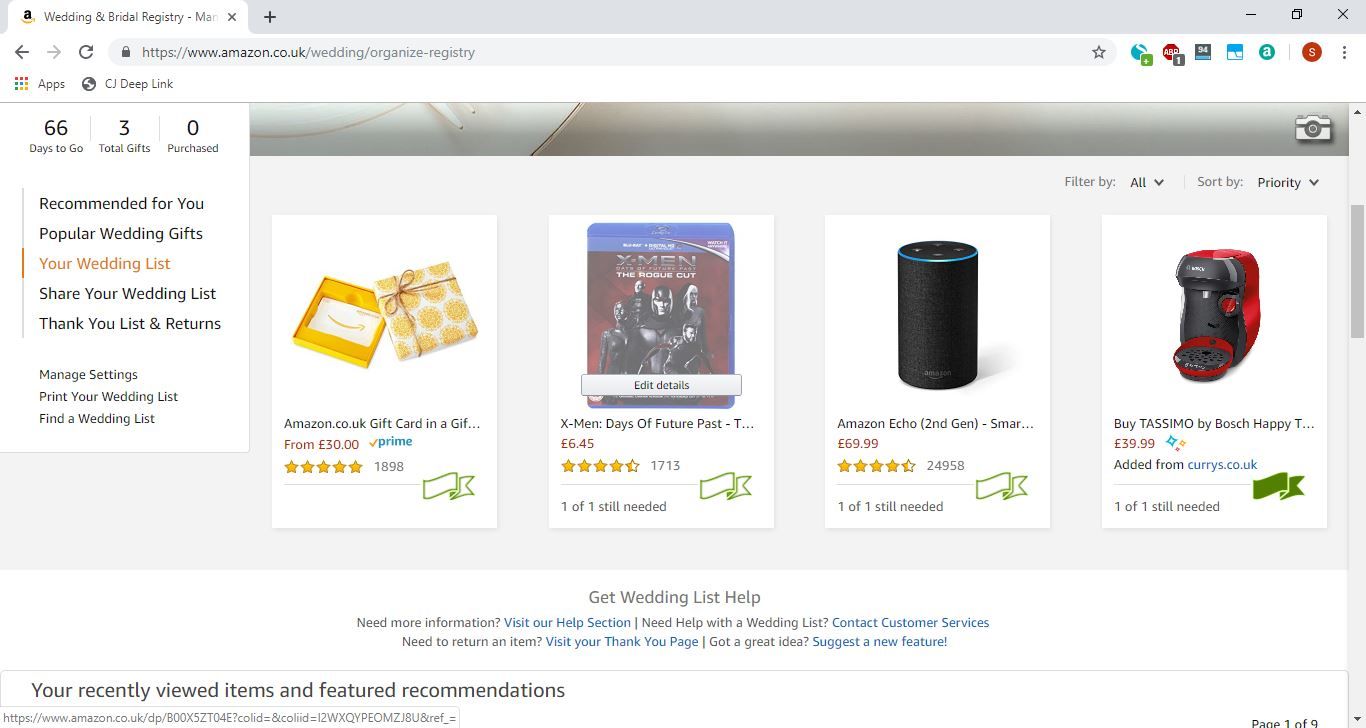
Here’s where you can add notes or remove the item. Alternatively, you can add a priority label to the item by clicking on the green ribbon outline.

Now that you’re all set with creating your wedding gift registry, we wish you good luck for the big day!
Author: Somrata Sarkar, Contributor, Tech Advisor

Previously a Tech Advisor Senior Staff Writer, Somrata researches and writes about the best tech deals to help readers make smart, informed buying decisions. She’s an expert on accessories and also reviews laptops, phones, audio and other devices.
Recent stories by Somrata Sarkar:
- How to get an Amazon Prime Student discount
- How to get cheap BT broadband if you’re on benefits
- The best tech gifts for Mother’s Day US
