Microsoft’s plans to revamp Windows 10 have been rumoured since last October, but we’ve heard very little from the company itself.
Chief Product Officer Panos Panay teased the idea of the ‘next generation of Windows’ at Microsoft’s Ignite developer conference in March, suggesting wholesale changes were on the horizon. However, that may have included Windows 10X , a project which has since been officially cancelled.
Still, CEO Satya Nadella continued the optimistic tone at Microsoft Build 2021, another developer-focused event. In an official address to kick-off the three-day conference, Nadella revealed that ‘one of the most significant updates to Windows of the past decade’ is on its way ‘soon’.
That’s a bold claim to make, especially as he’s likely referring to the 21H2 ‘Sun Valley’ update . Plenty of new features have been rumoured so far, but none that could justify a whole new era for Windows 10.
However, g iven how previous updates have brought very few noticeable changes, even the tweaks that Sun Valley is reported to bring could be deemed significant.

Image: Microsoft
Let’s run through some of the key ones.
The 21H2 update will see Windows 10 adopt Microsoft’s new ‘Fluent UI’ design language, complete with rounded corners and a simpler layout. System apps are getting redesigned to be more in keeping with the theme, so expect new versions of File Explorer, Email & Calendar and Settings.
A new Action Center is where the influence of Windows 10X will be most obvious. Its new look and feel aims to reduce clutter, with separate quick settings and audio controls from a dedicated notification area.
There will also be improvements to multitasking, with Windows 10’s Snap Assist feature now supporting individual tabs within the Edge browser. It will now remember the arrangement when connecting/disconnecting from an external monitor, too.
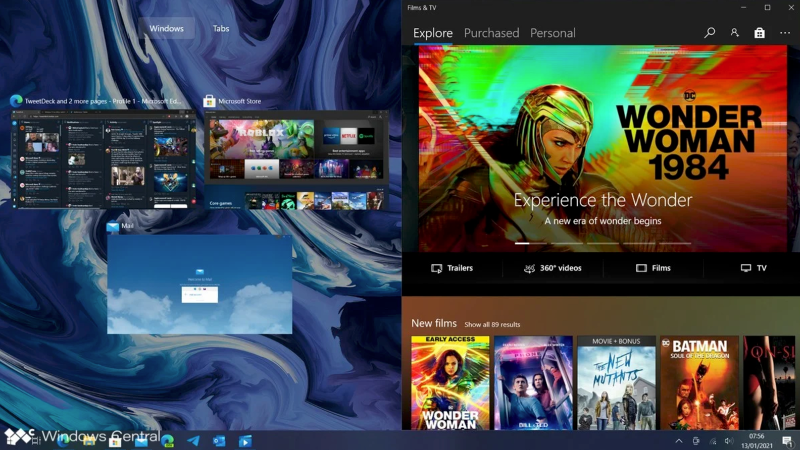
Image: Windows Central
The Sun Valley update is expected to add functionality for input methods besides a mouse and keyboard. Gestures will apparently be added to Windows 10’s tablet mode, with the ability to customise the on-screen keyboard. Elsewhere, voice and pen input will be supplemented with their own menus, which should hopefully make for a more intuitive experience.
Plenty of other minor changes are rumoured, although it looks like cross-device sync in Timeline will be removed. That means recent tabs and other history will no longer be available across multiple Windows 10 PCs signed into the same account.
It looks like the Sun Valley update will deliver Windows’ biggest changes in many years, but there’s not enough here for it to be classed as ‘next-gen’. The features listed above are primarily UI tweaks, there’s unlikely to be a big learning curve if you’re familiar with the current layout.
Author: Anyron Copeman, Mobile Editor, Tech Advisor

Anyron is Mobile Editor at Tech Advisor, where he’s been a mainstay of the editorial team since 2019. In his current role, Anyron is responsible for all smartphone, tablet and mobile network coverage on the site. A BA Journalism graduate, he has experience with a wide range of consumer tech products and services, including smartphones, tablets, foldables, wearables and more.
Recent stories by Anyron Copeman:
- Windows 11 23H2 update: Everything you need to know
- Windows 12: Everything we know so far
- How to get the Google Play Store on Windows 11
